Microsoft OneDrive - (Group PoliciesRedirect Folder)
Summary
This document implements group policies to redirect Windows known folders (Desktop, Documents, Pictures, Screenshots, and Camera Roll) to Microsoft OneDrive and outlines other desired modifications.
Dependencies
Associated Content
Implementation
Export the procedure from ProVal's VSA instance.
Name: Microsoft OneDrive - (Group Policies/Redirect Folder)

The export will download the necessary XML file.

Import this procedure into the partner's VSA instance.

Ensure the Managed Variable - M365TenantId is created prior to usage if folder redirection is desired.
Usage
ProVal Plug & Play: The agent procedure requires no configuration, but the options can be customized if desired by the partner.
Ensure the managed variable exists prior to usage.

| Name | Possible Values | Procedure Default | Description |
|---|---|---|---|
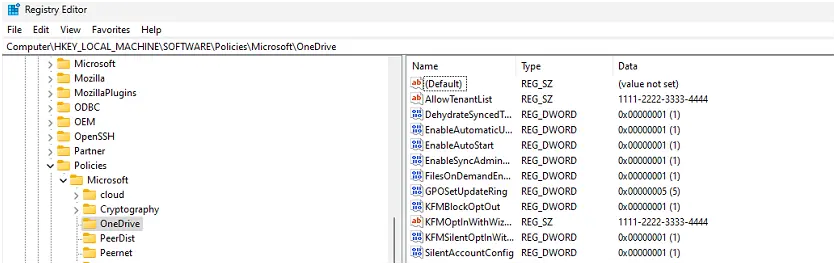
| SilentAccountConfig | (0/1) | 1 | Silently sign in users to the OneDrive sync app with their Windows credentials |
| FilesOnDemandEnabled | (0/1) | 1 | File contents don't download until a file is opened. |
| GPOSetUpdateRing | (4/5/0) | 5 | Sets the update ring for OneDrive. 4 for Insider, 5 for Production, or 0 for Deferred |
| DehydrateSyncedTeamSites | (0/1) | 1 | Convert Microsoft Teams site files to online-only files |
| EnableAutomaticUploadBandwidthManagement | (0/1) | 1 | This setting lets OneDrive upload data in the background only when unused bandwidth is available. |
| EnableSyncAdminReports | (0/1) | 1 | Lets OneDrive report sync device and health data and include it in administrative sync reports. |
| EnableAutoStart | (0/1) | 1 | Always start OneDrive automatically when signing in to Windows |
| AllowTenantList | <M365TenantId> | <M365TenantId> | This setting prevents users from easily uploading files to other organizations by specifying allowed tenant IDs |
| KFMBlockOptOut | (0/1) | 1 | This setting forces users to keep their Documents, Pictures, and Desktop folders directed to OneDrive. |
| KFMOptInWithWizard | <M365TenantId> | <M365TenantId> | This setting shows a window that prompts users to move their Documents, Pictures, and Desktop folders to OneDrive. |
| KFMSilentOptIn | <M365TenantId> | <M365TenantId> | This setting redirects and moves your users' Documents, Pictures, and/or Desktop folders to OneDrive without any user interaction. |
| KFMSilentOptInWithNotification | (0/1) | 1 | Shows a notification after a successful redirection. |
Output
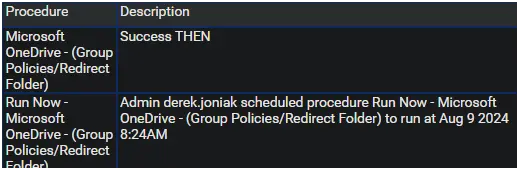
A status of Success is expected.

Changelog
2025-04-10
- Initial version of the document