Windows Secure Boot
Summary
The document details all the Custom Fields related Windows Secure Boot Audit.
Details
| Name | Level | Type | Default | Editable | Description |
|---|---|---|---|---|---|
| Windows Secure Boot | Endpoint | Text | Blank | No | Displays if Windows agent has secure boot enabled. |
| Windows Telemetry | Endpoint | Text | Blank | No | Displays if Windows Telemetry is enabled on a windows agent. |
| Windows DB Certificate | Endpoint | Text | Blank | No | Displays if windows agent has the updated 2023 DB Certificate. |
| Windows KEK Certificate | Endpoint | Text | Blank | No | Displays if windows agent has the updated 2023 KEK Certificate. |
Dependencies
Creation Process
Step 1
Navigate to Settings ➞ Custom Fields
Step 2
Locate the Add Field button on the right-hand side of the screen and click on it.
Step 3
The Add new custom field dialog box will occur
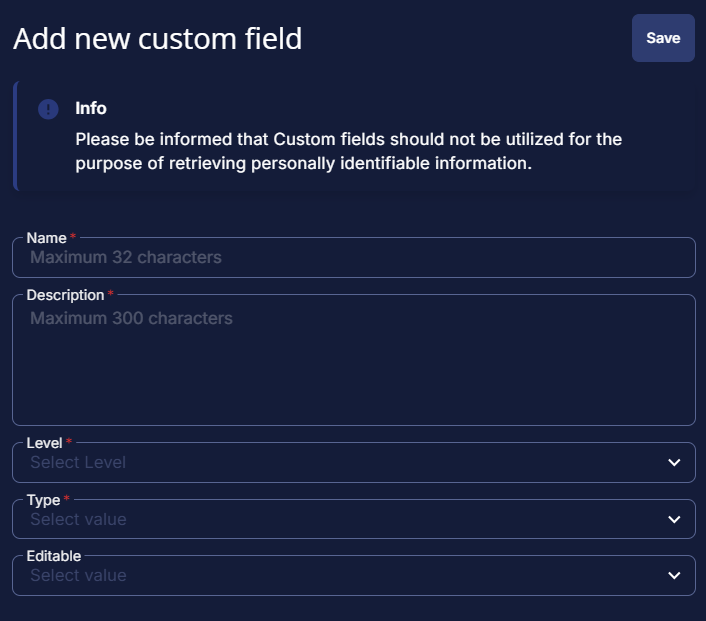
Follow the above steps for creating all the four custom fields.
Completed Custom Field
Windows Secure Boot

Windows Telemetry

Windows DB Certificate

Windows KEK Certificate

Changelog
2026-03-23
- Initial version of the document