cPVAL Antivirus Status
Summary
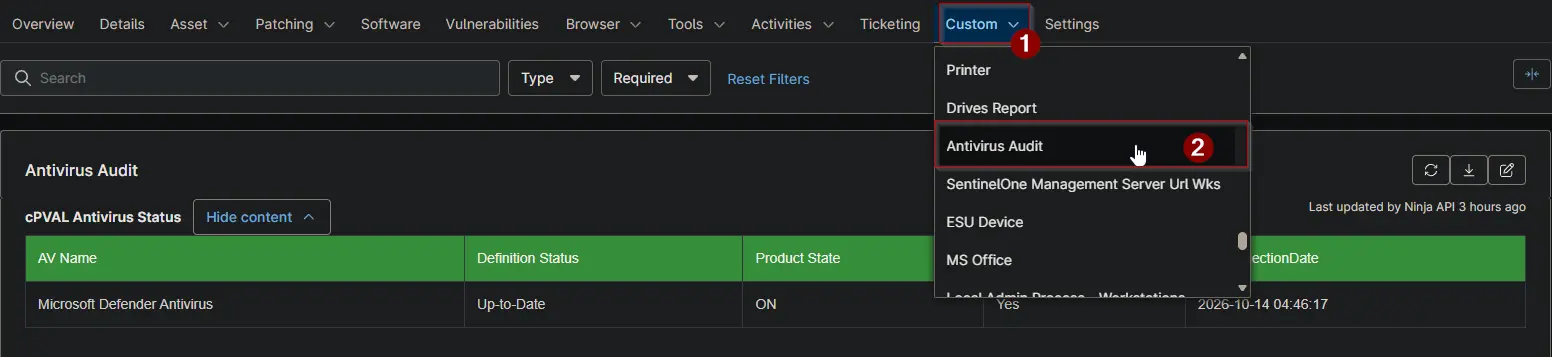
Shows the antivirus products NinjaOne reports for the device, with their definition status and whether they are switched on. Devices without antivirus are marked too. Use it to find devices that are unprotected, switched off or out of date. The Antivirus Status Audit automation fills this field for every Windows and Mac device. The Antivirus Status and Antivirus Missing reports collect it from every client.
note
The data comes from the antivirus information NinjaOne already shows under Details > Antivirus. Nothing is collected on the device itself.
Details
| Label | Field Name | Example | Definition Scope | Type | Required | Default Value | Dropdown Options | Editable | Custom Field Tab |
|---|---|---|---|---|---|---|---|---|---|
| cPVAL Antivirus Status | cpvalAntivirusStatus | HTML table | Device | WYSIWYG | False | - | - | Yes | Antivirus Audit |
Table Columns
The field holds a table with one row per antivirus product. A device without antivirus has a single row with Is Installed set to No.
| Column | Description |
|---|---|
| AV Name | The antivirus product, for example Microsoft Defender Antivirus. |
| Definition Status | Whether the virus definitions are current, for example Up-to-Date. |
| Product State | Whether the antivirus is switched on: ON or OFF. |
| Is Installed | Yes for an antivirus product. No when NinjaOne reports no antivirus for the device. |
| DataCollectionDate | When NinjaOne collected the antivirus information. Blank when NinjaOne has no antivirus information for the device. |
Dependencies
- Automation: Antivirus Status Audit
- Audit Report: Antivirus Status
- Audit Report: Antivirus Missing
- Solution: Antivirus Status Audit
Custom Field Creation
Sample Screenshot
Changelog
2026-10-14
- Initial version of the document