Local Machine - Domain - Remove
Overview
This automation removes a Windows computer from the Active Directory domain it is joined to and moves it to the default WORKGROUP. The change takes effect at the next restart, which the automation can do straight away. Use it as the first step when moving a computer from Active Directory to Microsoft Entra ID, before Join Computer to Entra.
note
Make sure you know the password of a local administrator account on the computer before you run it. After the restart, domain accounts, including cached domain logons, can no longer sign in to the computer.
Requirements
- Windows computer joined to an Active Directory domain
- Run As:
System - Windows PowerShell 5.1. The automation stops if it runs in PowerShell 7.
- Network access to a domain controller of the computer's domain
- A domain account that's allowed to remove the computer from the domain
Sample Run
Removes the computer from its domain as CONTOSO\admin and restarts it straight away.
| Script Variable | Value |
|---|---|
| Domain Admin Username | CONTOSO\admin |
| Domain Admin Password | The password of CONTOSO\admin |
| Restart Computer | Selected |
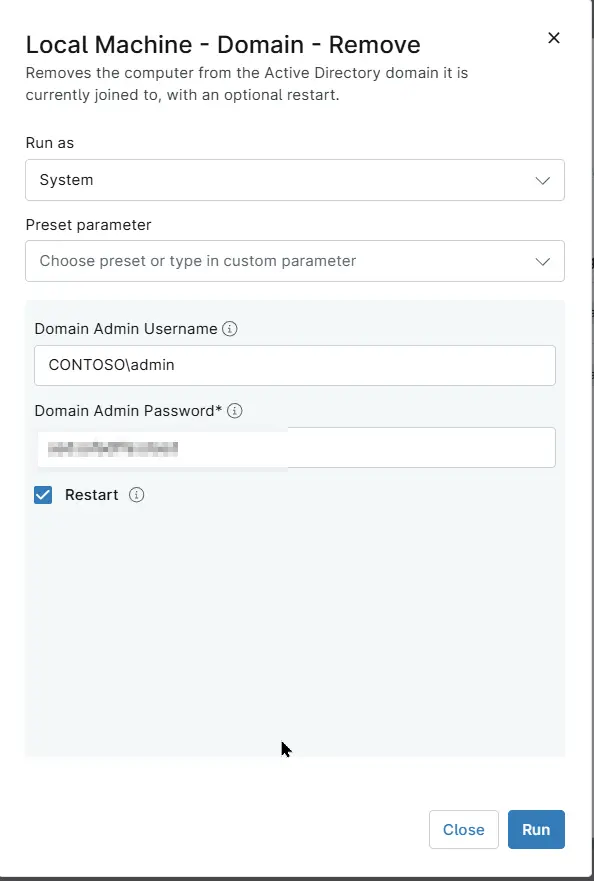
Parameters
| Name | Calculated Name | Example | Accepted Values | Required | Default | Type | Description |
|---|---|---|---|---|---|---|---|
| Domain Admin Username | domainAdminUsername | CONTOSO\admin | DOMAIN\user, user@domain.com, or a user name only | False | String/text | Domain account allowed to remove the computer. If you leave out the domain, the computer's current domain is added in front. | |
| Domain Admin Password | domainAdminPassword | -- | The account's password | True | String/password | Password of the domain account. | |
| Restart Computer | restartComputer | True | True/False | False | False | Boolean | Restarts the computer straight after it is removed from the domain. If it is not selected, the change takes effect at the next restart. |
Scenarios
- Computer joined to a domain: the automation removes it from the domain, moves it to
WORKGROUPand disables its computer account in Active Directory. It restarts the computer if Restart Computer is selected. - Computer not joined to a domain: nothing is changed and the automation finishes successfully.
- Removal fails: for example because of a wrong password or no access to a domain controller. Nothing is changed and the automation shows as failed with the reason.
Dependencies
Automation Setup/Import
Output
- Activity Details
- The computer removed from its Active Directory domain, and restarted if Restart Computer is selected
Changelog
2026-11-17
- Initial version of the document