Configure Winget Auto Update
Summary
The script deploys and configures a self-contained, portable Winget auto-update solution on the endpoint. It is completely independent of any external Winget-AutoUpdate software, using the Configure-WingetAutoUpdate PowerShell script. The solution deploys a portable copy of Winget and its dependencies, writes approval lists (whitelist/blacklist), stores the auto-update policy for auditing, and registers scheduled tasks for system and optionally user context.
Two remote monitors are created to ensure ongoing health:
- Winget Auto Update Errors – detects runtime failures in the update process. This monitor is only created when the client‑level EDF
WAU - MonitorFailuresis flagged. - Winget Auto Update Configuration Check – verifies that the scheduled tasks and stored configuration are intact and automatically triggers a repair if they are missing. This monitor is created whenever the Winget Auto Update solution is enabled (i.e., the
Winget Auto UpdateEDF is notDisabledand the computer/location is not excluded).
Configuration is driven entirely by client, location, and computer EDFs, which are explained later in this document.
Update Notice: 30‑June‑2026
If you are updating the solution after 30‑June‑2026, you must run the script once with Set_Environment = 1 to implement the new EDF structure (removal of WAU - NotificationLevel and addition of the Audit Only dropdown option).
Sample Run
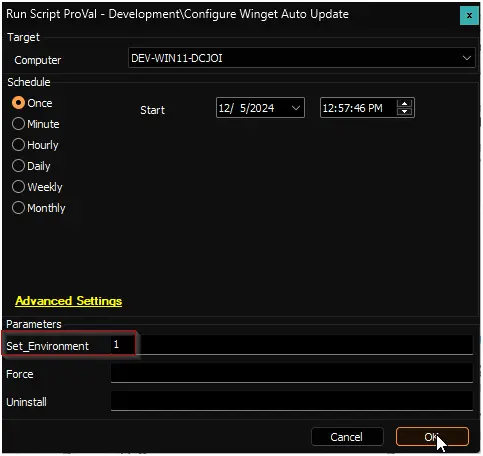
First Run / Environment Setup:
When setting up the solution for the first time, or when upgrading from a version prior to 30‑June‑2026, run the script with the Set_Environment parameter set to 1. This creates the necessary pvl_wau_config table, inserts all required EDFs, adds the new Audit Only option to the Winget Auto Update dropdown, and removes any obsolete EDFs (e.g., WAU - NotificationLevel).
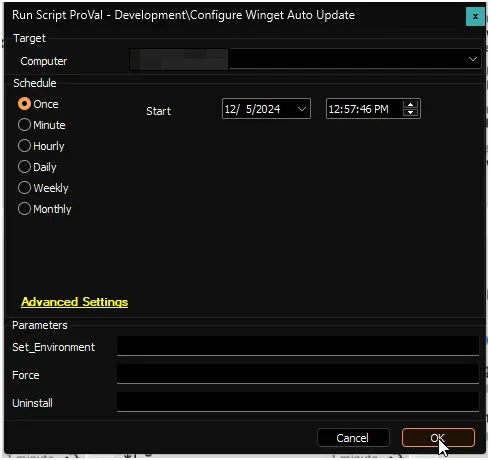
Regular Execution:
Uninstall:
Setting Uninstall to 1 removes all scheduled tasks, runtime files, stored configuration, and deletes the remote monitors, including Winget Auto Update Errors.

Force:
The script normally compares the existing configuration with the EDF settings before making changes. Setting Force to 1 skips this comparison and re‑deploys all components, including re‑installing the portable Winget files.

Dependencies
- PowerShell - Configure-WingetAutoUpdate
- Internal Monitor - Execute Script - Configure Winget Auto Update
- Solution - Winget Auto Update
Global Variables
| Name | Value | Accepted Values | Description |
|---|---|---|---|
| Debug | False | False, True | When True, enables informational logging; when False (default), informational logs are suppressed to avoid adding entries to the h_scripts table. Set to True to assist with troubleshooting. |
| ScriptEngineEnableLogger | False | False, True | When True, enables final (success/failure) logging; when False (default), these logs are suppressed to avoid adding entries to the h_scripts table. Set to True to assist with troubleshooting. |
User Parameters
| Name | Example | Required | Description |
|---|---|---|---|
| Set_Environment | 1 | True (for first execution) | Run the script with the Set_Environment parameter set to 1 for the first run to create the pvl_wau_config table and EDFs used by the solution. Also required when upgrading from a version prior to 30‑June‑2026 to migrate the EDF structure. |
| Force | 1 | False | The script's default nature is to compare the existing configuration before running the installation. Setting the Force to 1 will skip the comparison and re‑deploy all components, including portable Winget files. |
| Uninstall | 1 | False | Removes the scheduled tasks, runtime files, stored configuration, and both remote monitors. |
Client-Level EDF
| Name | Example | Type | Dropdown Options / Notes | Description |
|---|---|---|---|---|
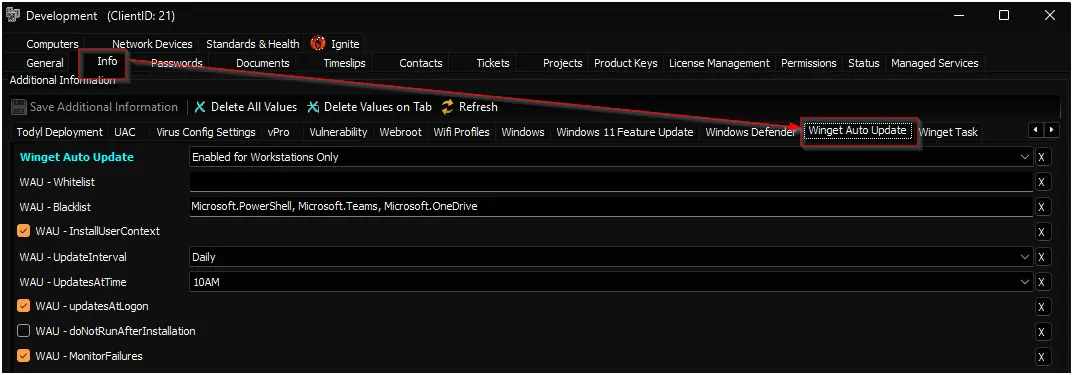
| Winget Auto Update | Enabled for Servers and Workstations | Dropdown |
| Set this EDF to enable the Winget Auto Update solution. The Audit Only mode performs application inventory auditing without installing any update schedules. |
| WAU - Whitelist | Ditto.Ditto, Greenshot.Greenshot, HeidiSQL.HeidiSQL... | Text | A comma-separated list of applications to update. By default, all applications are updated unless a whitelist is defined. This list overrides the blacklist. Windows App Runtime packages are unconditionally excluded regardless of this list. | |
| WAU - Blacklist | Ditto.Ditto, Greenshot.Greenshot, HeidiSQL.HeidiSQL... | Text | A comma-separated list of applications to exclude. Only one of Whitelist or Blacklist may be used; Whitelist takes precedence if both are supplied. Windows App Runtime packages do not need to be listed here as they are excluded by default. | |
| WAU - InstallUserContext | Check-Box | Flag this EDF to enable auto-update for user-level applications in addition to system-wide ones. Note: End users may see a PowerShell window during the scheduled update. | ||
| WAU - UpdateInterval | Daily | Dropdown | Daily · BiDaily · Weekly · BiWeekly · Monthly · Never | Specifies the frequency of update checks. Default: Daily. |
| WAU - UpdatesAtTime | 06AM | Dropdown | 12‑hour format with 30‑minute increments (see previous dropdown list) | Specifies the time for updates in 12‑hour format. Default: 06AM. |
| WAU - updatesAtLogon | Check-Box | When flagged, the update task also runs at user logon. Can be combined with UpdatesAtTime. | ||
| WAU - doNotRunAfterInstallation | Check-Box | Flag to prevent the update runtime from executing immediately after configuration. By default, it runs once after setup. | ||
| WAU - MonitorFailures | Check-Box | Flag to create the Winget Auto Update Errors remote monitor, which alerts on runtime failures. |
The deprecated WAU - NotificationLevel EDF has been removed. Notification settings are no longer configurable; the solution operates silently.
Location-Level EDF
| Name | Type | Section | Description |
|---|---|---|---|
| Exclude From Winget Auto Update | Check-Box | Exclusions | Flag this EDF to exclude the location from the Winget Auto Update solution. |
Computer-Level EDF
| Name | Type | Section | Description |
|---|---|---|---|
| Exclude From Winget Auto Update | Check-Box | Exclusions | Flag this EDF to exclude the computer from the Winget Auto Update solution. |
Notes
Windows App Runtime Exclusion
The underlying Configure-WingetAutoUpdate script unconditionally excludes Windows App Runtime packages (Microsoft.WindowsAppRuntime*) from updates. This exclusion is hardcoded into the update runtime and applies before any approval lists (whitelist or blacklist) are evaluated.
- You do not need to add these packages to the
WAU - BlacklistEDF. - They will not be updated even if explicitly listed in the
WAU - WhitelistEDF. - This prevents the accumulation of side-by-side framework builds, as these are shared runtime components rather than standalone applications.
- The companion Get-WingetReport audit script mirrors this behaviour and will always report these packages with auto-update disabled.
Output
Scheduled Tasks
Two tasks are created under the \WAU\ path:
| Task Name | Context | Description |
|---|---|---|
Winget-AutoUpdate | SYSTEM | Runs the update runtime on the defined schedule (and optionally at logon). |
Winget-AutoUpdate-UserContext | User | Created only if WAU - InstallUserContext is flagged. Runs after the system task finishes. |
Note: The legacy Winget-AutoUpdate-Notify and Winget-AutoUpdate-Policies tasks are no longer used. They are automatically removed when the new solution is deployed.
Files
| Path | Description |
|---|---|
C:\ProgramData\_Automation\App\Winget\ | Portable Winget and its dependencies. |
C:\ProgramData\_Automation\Script\Winget-AutoUpdate\ | Runtime script (Winget-UpdateApproved.ps1), silent launcher (SilentLauncher.exe), approval lists (included_apps.txt / excluded_apps.txt), and runtime logs. |
C:\ProgramData\_Automation\Script\Winget-AutoUpdate\Winget-UpdateApproved-error.txt | Error log generated by the update runtime. Cleared at the start of each run. |
C:\ProgramData\_Automation\Script\Winget-AutoUpdate\Winget-UpdateApproved-log.txt | Informational log from the update runtime. |
Remote Monitors
| Monitor Name | Trigger | Behavior |
|---|---|---|
| Winget Auto Update Errors | Checks for existence of the runtime error log. If present and recently written, it raises an alert with the failure details. | Created when WAU - MonitorFailures is flagged. |
| Winget Auto Update Configuration Check | Validates that the scheduled tasks exist (1–2 tasks) and the stored configuration table is present. If either fails, it returns "Force", which triggers a re‑run of the solution with the -Force parameter to repair the configuration. | Always created when the solution is enabled, regardless of other EDFs. This monitor runs every hour. |
Changelog
2026-09-10
- Enhanced the Implementation PowerShell script.
- Added documentation notes regarding the unconditional exclusion of Windows App Runtime packages (
Microsoft.WindowsAppRuntime*) by the underlying PowerShell script.
2026-09-03
- Fixed error validation remote monitor creation logic.
2026-07-01
- Replaced the legacy Romanitho Winget-AutoUpdate software with an independent, portable Winget solution using the Configure-WingetAutoUpdate PowerShell script.
- Removed the
WAU - NotificationLevelEDF and all related notification settings. - Added the
Audit Onlyoption to theWinget Auto UpdateEDF dropdown. - Introduced a new remote monitor Winget Auto Update Configuration Check to automatically detect and repair missing configurations.
- Updated all file paths, scheduled tasks, and monitor logic to reflect the new architecture.
- Cleaned up obsolete EDFs and database columns (e.g.,
notificationcolumn inpvl_wau_config).
2025-04-10
- Fixed the script where it was exiting with Success status when it failed because it wasn't able to download the ps1 file
2025-04-08
- Initial version of the document