Installed Remote Access Tools Report
Overview
The script inventories the endpoint for a curated list of remote access utilities by inspecting uninstall keys, running processes, installed services, and known executable paths. Optional exclusions can be provided through the Datto component parameter ToolsToIgnore. When the OutputUDF parameter is supplied, the detected tool names are saved to the specified Datto UDF that is dedicated to this automation and not shared with other components. All findings are also written to the Datto activity log for auditing purposes.
Supported tool display names (use exact spelling when excluding):
AeroAdminAmmyy AdminAnyDeskBeyondTrustChrome Remote DesktopConnectwise ControlDWServiceGoToMyPCLiteManagerLogMeInManageEngineNinja RMMNoMachineParsecRemote UtilitiesRemotePCSplashtopSupremoTeamViewerTightVNCUltraVNCVNC Connect (RealVNC)Zoho AssistAteraAutomateDatto RMMKaseyaN-Able N-CentralN-Able N-SightSyncro
Implementation
-
Download the component Installed Remote Access Tools Report from the attachments.
-
After downloading the attached file, click on the
Importbutton -
Select the component just downloaded and add it to the Datto RMM interface.

Sample Run
To execute the component over a specific machine, follow these steps:
-
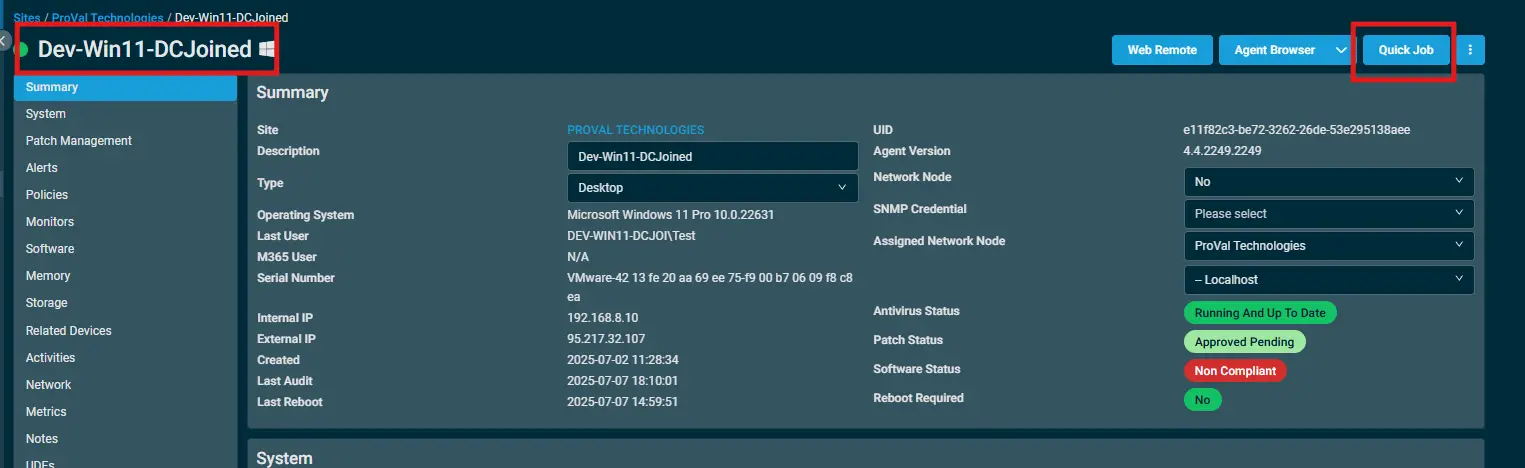
Select the machine you want to run the
componenton from the Datto RMM. -
Click on the
Quick Jobbutton.
-
Search the component
Installed Remote Access Tools Reportand click onSelect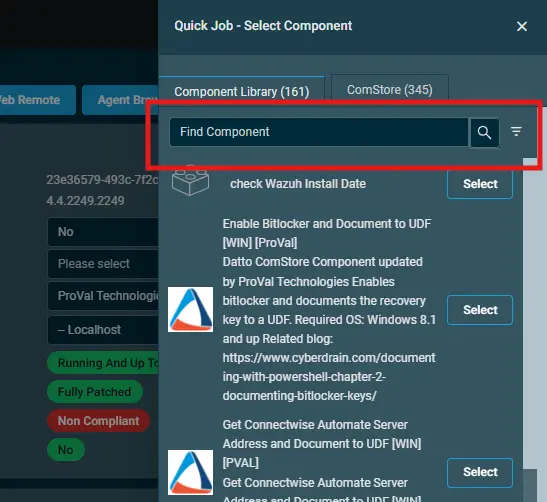
-
-
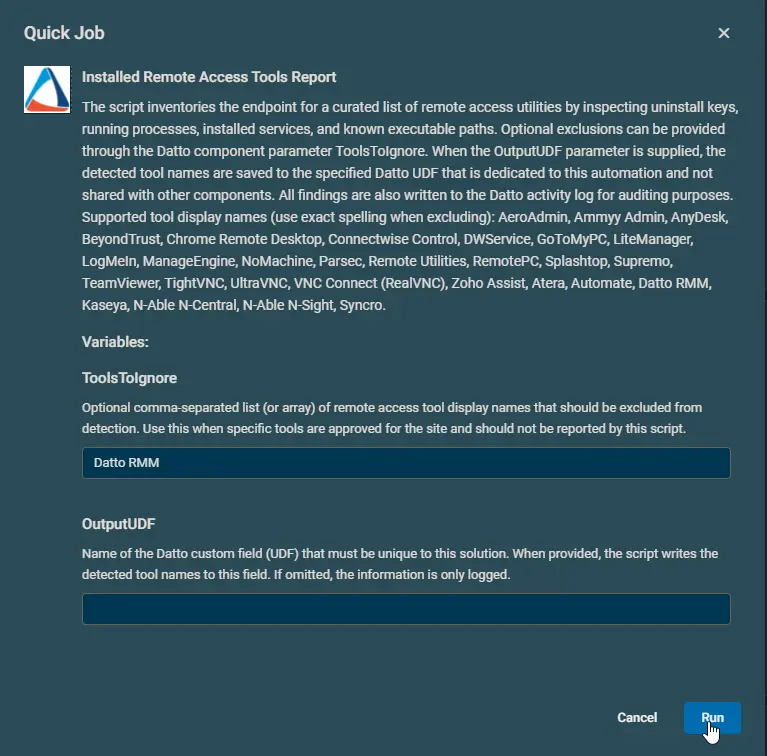
Example 1: Fetching the information of all installed remote access tools except 'Datto RMM'. Data will not be stored to UDF.
-
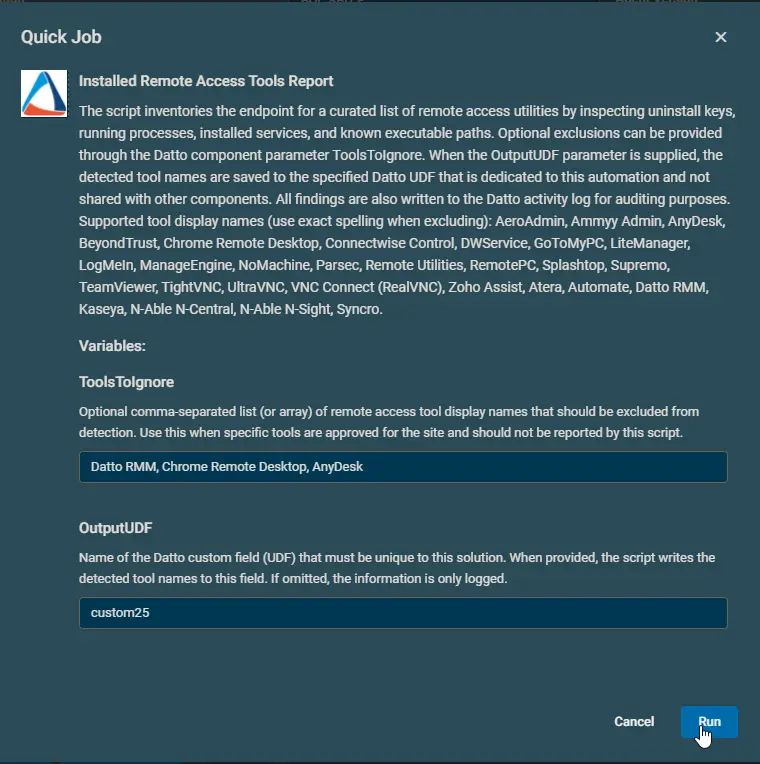
Example 2: Fetching the information of all installed remote access tools except 'Datto RMM', 'Chrome Remote Desktop', and 'AnyDesk'. Detected names will be stored the User Data Field 25.
-
Datto Variables
| Variable Name | Example | Type | Default | Mandatory | Description |
|---|---|---|---|---|---|
| ToolsToIgnore |
| String | Datto RMM | False | Optional comma-separated list (or array) of remote access tool display names that should be excluded from detection. Use this when specific tools are approved for the site and should not be reported by this script. |
| OutputUDF | custom25 | String | False | Name of the Datto custom field (UDF) that must be unique to this solution. When provided, the script writes the detected tool names to this field. If omitted, the information is only logged. |
Output
-
UDF

-
StdOut
Installed Remote Access Tools ReportDetected 3 remote access tool(s). Full details:Name : Connectwise ControlInstalled : YesCurrentlyRunning : YesHasRunningService : YesUninstallString :ExePath :Name : AutomateInstalled : YesCurrentlyRunning : NoHasRunningService : NoUninstallString :ExePath : C:\Windows\LTSvc\LTSvc.exeName : KaseyaInstalled : YesCurrentlyRunning : YesHasRunningService : YesUninstallString : "C:\Program Files (x86)\Kaseya\XXXXXXXXXXXXXXXXXXXX\KASetup.exe" /r /g XXXXXXXXXXXXXXXXXXXX /l"%TEMP%\kasetup.log"ExePath :custom25 : Connectwise Control, Automate, KaseyaPSPath : Microsoft.PowerShell.Core\Registry::HKEY_LOCAL_MACHINE\SOFTWARE\CentraStagePSParentPath : Microsoft.PowerShell.Core\Registry::HKEY_LOCAL_MACHINE\SOFTWAREPSChildName : CentraStagePSDrive : HKLMPSProvider : Microsoft.PowerShell.Core\RegistryRecorded the active remote access tool list in Datto UDF 'custom25'. -
StdErr
Attachments
Installed Remote Access Tools Report
Changelog
2025-11-20
- Initial version of the document