cPVAL Auto Reboot Status
Summary
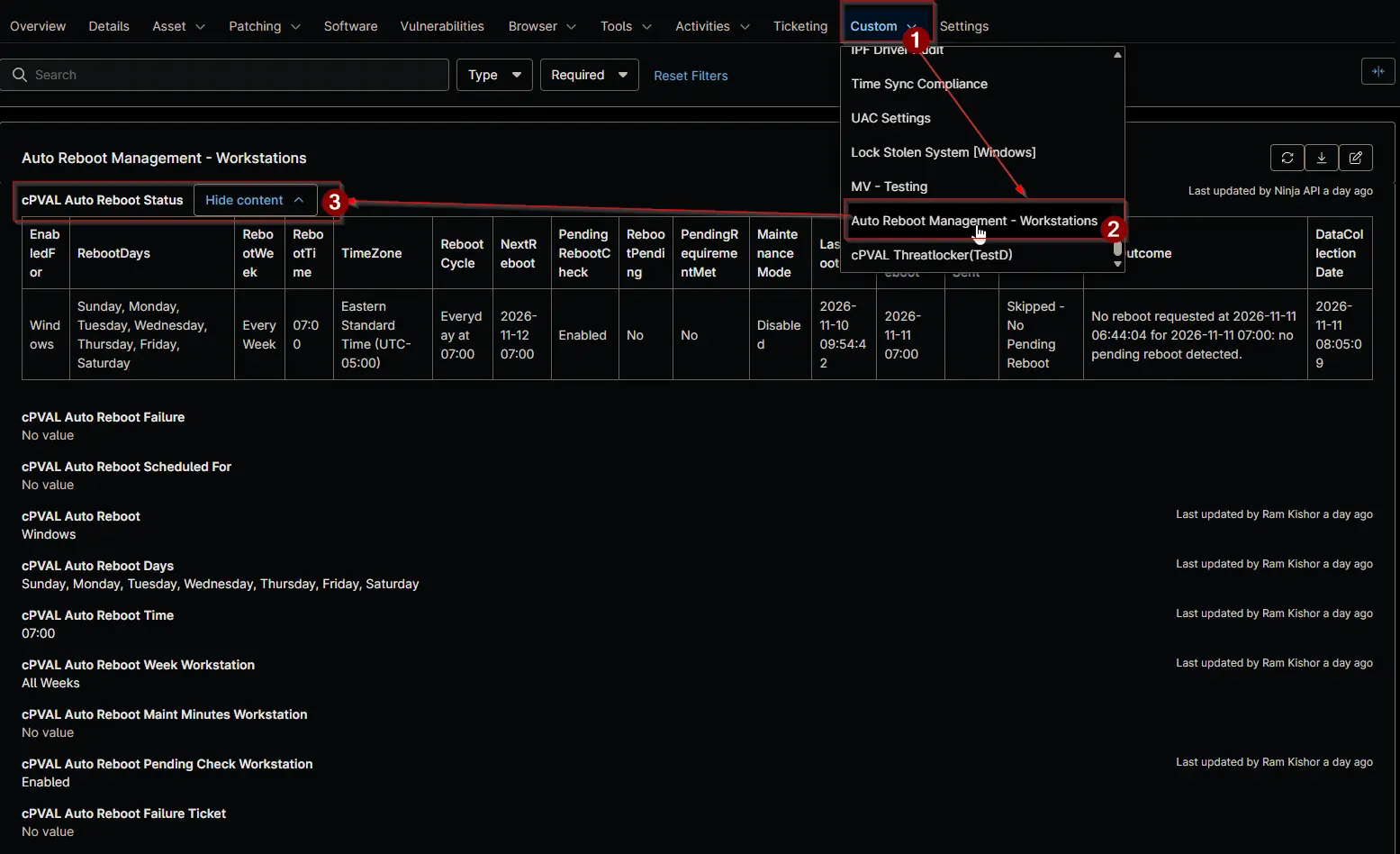
Shows the effective Auto Reboot Management - NinjaOne schedule of the device, its next restart and the result of its last scheduled restart, as a one row table. The Auto Reboot Management automation writes it on every device enabled for auto reboot, and the Auto Reboot Management Status report combines it across devices.
| Column | Shows |
|---|---|
| EnabledFor | The value of cPVAL Auto Reboot that applies to the device. |
| RebootDays | The days the device restarts on. |
| RebootWeek | Every Week, or the week of the month, such as Week 2. |
| RebootTime | The restart time. |
| TimeZone | The time zone of all times in the table, which is the time zone of the primary machine that runs Auto Reboot Management, for example Eastern Standard Time (UTC-05:00). |
| RebootCycle | The full schedule, for example 2nd Tuesday at 02:00. |
| NextReboot | The date and time of the next restart. |
| PendingRebootCheck | Whether the pending reboot check applies: Enabled or Disabled. |
| RebootPending | Whether NinjaOne reports a pending reboot: Yes or No. |
| PendingRequirementMet | Yes, No, or Not Required when the check doesn't apply. |
| MaintenanceMode | The maintenance mode applied around the restart, such as 30 minutes, or Disabled. |
| LastReboot | When the device last started. |
| LastScheduledReboot | The restart the solution last handled. |
| LastRebootSent | When the restart request was written. |
| RebootResult | The result of the last scheduled restart. See below. |
| LastOutcome | Details of the last action, such as when the device scheduled the restart. |
| DataCollectionDate | When the row last changed. |
| RebootResult | Meaning |
|---|---|
Awaiting Reboot | The restart was requested and its time hasn't passed by 30 minutes yet. |
Rebooted | The device started after the restart was requested. |
Not Rebooted | The device scheduled the restart but, 30 minutes after the restart time, is online and hasn't restarted. |
Not Confirmed - Offline | The device scheduled the restart and is offline 30 minutes after the restart time, so the restart can't be confirmed. |
Not Picked Up | The device is online 30 minutes after the restart time but never acted on the request. |
Failed - On Device | The device couldn't schedule the restart. |
Skipped - Offline | The device was offline when its restart was due, so no restart was requested. No restart. |
Skipped - Missed | The device received the request after the restart time and didn't restart. |
Skipped - Cancelled | The request was cleared before the restart was confirmed. |
Skipped - No Pending Reboot | The pending reboot check applied and no reboot was pending. |
note
- All times in the table are in the time zone shown in TimeZone, not the device's own time zone.
- The table is rewritten only when a value other than DataCollectionDate changes.
- It's cleared when the device is no longer enabled for auto reboot.
- The field is script-managed and read only for technicians.
Details
| Label | Field Name | Example | Definition Scope | Type | Required | Default Value | Dropdown Options | Editable | Custom Field Tab |
|---|---|---|---|---|---|---|---|---|---|
| cPVAL Auto Reboot Status | cpvalAutoRebootStatus | HTML table | Device | WYSIWYG | No | No |
|
Dependencies
- Automation: Auto Reboot Management
- Audit Report: Auto Reboot Management Status
- Automation: WYSIWYG Custom Field Report - Organization and Global KB
- Scheduled Task: Auto Reboot Management
- Solution: Auto Reboot Management - NinjaOne
Custom Field Creation
Sample Screenshot
Changelog
2026-11-11
- Initial version of the document