Implement - RDS Hosts - Allow New Connections Status
Summary
This remote monitor checks for the Allow New Connections status of the Remote Desktop Host servers. If the status is False, then it is supposed to create the ticket.
Details
Suggested "Limit to": Group bound with a search of servers having role Windows RDS Session Host`
Suggested Alert Style: Once
Suggested Alert Template: Default - Create Automate Ticket
Dependencies
Ticketing
Subject:Allow New Connections is set to FALSE on RDS Server "%computername%" of Client: %clientname%
Body:%NAME% %STATUS% on %CLIENTNAME%\%COMPUTERNAME% at %LOCATIONNAME% for %FIELDNAME% result %RESULT%.
Implementation Steps
- Run this SQL query from a RAWSQL monitor set to create the alert template.
#Insert Role
INSERT IGNORE INTO `roledefinitions` (`RoleName`, `RoleType`, `RoleSubType`, `DetectionString`, `ComparisonOperator`, `ComparisonResult`, `SerialKeyString`, `ProductKeyString`, `RoleDetectionGuid`, `IsRemote`, `SearchId`, `IsSupport`, `ParentRoleDefinitionGuid`, `OsType`) VALUES ('Windows RDS Session Host', 'Remote Desktop Services', 'Role', '{%@powershell "(Get-WindowsFeature RDS-RD-Server).Installed"@%}', 'eq', 'True', '', '', '51b2cad8-14a3-11eb-bceb-0e924934e3ef', 1, 0, 0, '', 1);

#Insert Search
INSERT IGNORE INTO `sensorchecks` (`SensID`, `Name`, `SQL`, `QueryType`, `ListDATA`, `FolderID`, `GUID`, `SearchXML`, `UpdatedBy`, `UpdateDate`) VALUES (1406, 'Windows RDS Session Host Servers', 'SELECT \r\n   computers.computerid as `Computer Id`,\r\n   computers.name as `Computer Name`,\r\n   clients.name as `Client Name`,\r\n   computers.domain as `Computer Domain`,\r\n   computers.username as `Computer User`,\r\n   IFNULL(crd1.RoleDefinitionId,0) as `Windows RDS Session Host-1`\r\nFROM Computers \r\nLEFT JOIN inv_operatingsystem ON (Computers.ComputerId=inv_operatingsystem.ComputerId)\r\nLEFT JOIN Clients ON (Computers.ClientId=Clients.ClientId)\r\nLEFT JOIN Locations ON (Computers.LocationId=Locations.LocationID)\r\nLEFT JOIN ComputerRoleDefinitions crd1 ON (crd1.ComputerId=Computers.ComputerId And crd1.RoleDefinitionId=(Select RoleDefinitionId From RoleDefinitions Where RoleDetectionGuid=\'51b2cad8-14a3-11eb-bceb-0e924934e3ef\') And (crd1.Type=1 OR (crd1.CurrentlyDetected=1 and crd1.Type<>2)))\r\n WHERE \r\n((IFNULL(crd1.RoleDefinitionId,0) >0 ))\r\n', 4, 'Select||=||=||=|^Select|||||||^', 0, '33b86301-043d-4268-90cd-cd91965d3b56', '<LabTechAbstractSearch><asn><st>AndNode</st><cn><asn><st>ComparisonNode</st><lon>Computer.LabTech.Roles</lon><lok>Computer.LabTech.Roles</lok><lmo>HasRole</lmo><dv>Windows RDS Session Host</dv><dk>51b2cad8-14a3-11eb-bceb-0e924934e3ef</dk></asn></cn></asn></LabTechAbstractSearch>', NULL, NULL);

#Insert Group
SET @Searchid = (SELECT sensid from sensorchecks where `GUID` = '33b86301-043d-4268-90cd-cd91965d3b56') ;
SET @Parentid = (SELECT MIN(groupid) FROM mastergroups WHERE `Name` = '_System Automation') ;
SET @Parents = (SELECT CONCAT(',',MIN(groupid),',') FROM mastergroups WHERE `Name` = '_System Automation') ;
INSERT IGNORE INTO `mastergroups` (`GroupID`, `ParentID`, `Parents`, `Children`, `depth`, `Name`, `FullName`, `Permissions`, `Template`, `AutoJoinScript`, `Master`, `LimitToParent`, `Control`, `ControlID`, `Notes`, `MaintenanceID`, `MaintWindowApplied`, `GroupType`, `Priority`, `GUID`, `assetID`, `NetworkPermissions`, `NetworkJoin`, `NetworkJoinOptions`, `ContactPermissions`, `ContactJoin`, `ContactJoinOptions`) VALUES ('', @Parentid, ',@Parents,', ',', 1, 'Windows RDS Session Host Servers', '_System Automation.Windows RDS Session Host Servers', 0, 0, @Searchid, 2, 1, 0, 0, '', 0, (NOW()), 4, 5, '86d05b2b-4bd2-11ee-955e-000c295e5f21', NULL, NULL, 0, 0, NULL, 0, 0);

#Insert Remote Monitor
SET @Groupid = (SELECT Groupid From MasterGroups where `GUID` =  '86d05b2b-4bd2-11ee-955e-000c295e5f21' ) ;
SET @Alertaction = (SELECT alertactionid FROM alerttemplate WHERE `GUID` = 'b69f8015-501e-4781-9e42-e23e0058bcd4') ;
INSERT IGNORE INTO `groupagents` (`AgentID`, `GroupID`, `SearchID`, `Name`, `CheckAction`, `AlertAction`, `AlertMessage`, `ContactID`, `interval`, `Where`, `What`, `DataOut`, `Comparor`, `DataIn`, `IDField`, `AlertStyle`, `ScriptID`, `datacollector`, `Category`, `TicketCategory`, `ScriptTarget`, `GUID`, `UpdatedBy`, `UpdateDate`) VALUES ('', @Groupid, 0, 'RDS Hosts - Allow New Connections Status', 6, 1, 'Allow New Connections is set to FALSE on RDS Server "%computername%" of Client: %clientname%~~~%NAME% %STATUS% on %CLIENTNAME%\\%COMPUTERNAME% at %LOCATIONNAME% for %FIELDNAME% result %RESULT%.!!!Allow New Connections is set to FALSE on RDS Server "%computername%" of Client: %clientname%~~~%NAME% %STATUS% on %CLIENTNAME%\\%COMPUTERNAME% at %LOCATIONNAME% for %FIELDNAME% result %RESULT%.', 0, 600, '127.0.0.1', '7', 'C:\\Windows\\System32\\WindowsPowerShell\\v1.0\\powershell.exe -ExecutionPolicy Bypass -Command "$rdshSettings = Get-CimInstance -Namespace \'root\\CIMv2\\TerminalServices\' -Class Win32_TerminalServiceSetting -ComputerName \\"$env:computername\\";$allowNewConnections = $rdshSettings.AllowTSConnections;$allowNewConnections;if ($allowNewConnections -eq $false) {Write-Output \\"Allow new connections is set to FALSE on $env:computername\\"} else {Write-Output \\"Allow new connections is NOT set to FALSE on $env:computername\\"}"', 5, 'Allow new connections is NOT set to FALSE', '', 1, 0, '', 16, 0, 1, '52107a52-7a5b-4cc6-84ff-47ed9b68043c', 'root', (NOW())
-
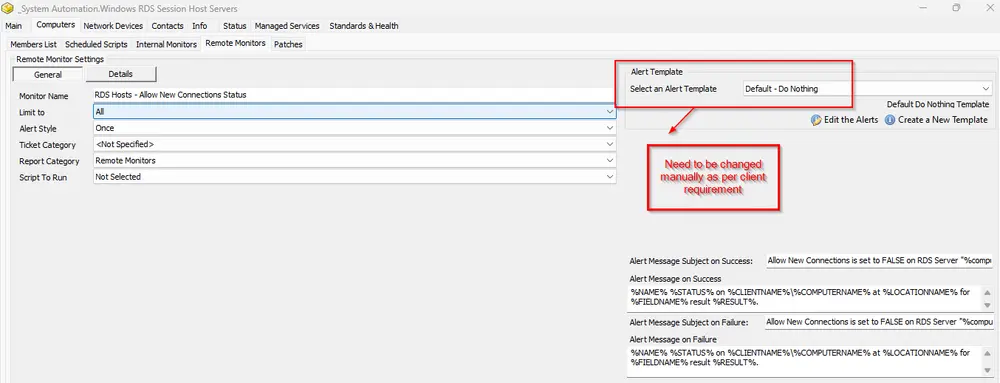
Note: This implementation step will create a role RSM - Remote Desktop Services - Role - Windows RDS Session Host, a search "Windows RDS Session Host Servers" bound with the above role, a group named "Windows RDS Session Host Servers" limited to the above search, and lastly, the remote monitor RDS Hosts - Allow New Connections Status will be created on the group with the alert template "Default - Do Nothing".
-
This needs to be changed to the "Default - Create Automate Ticket" or any other template that the client needs, such as emailing or ticket creation.
Changelog
2025-04-10
- Initial version of the document