Scheduled Tasks - Winget Update All
Purpose
The ultimate objective of this solution is to establish and oversee two scheduled tasks designed to update installed applications utilizing Winget on Windows 10 and 11 machines within the environment.
- The
Winget Update All [System]task executes Winget'supgrade allcommand upon system boot (after network connection) under the SYSTEM context. - The
Winget Update All [Logged on User]task initiates Winget'supgrade allcommand upon user login.
Note: Excluding the client/location/computer will remove both scheduled tasks from the associated endpoint(s).
Associated Content
Script
| Content | Type | Function |
|---|---|---|
| Script - Scheduled Task - Create - Winget Update All [Autofix] | Script | Creates the tasks. |
| Script - Scheduled Task - Delete - Winget Update All [Autofix] | Script | Deletes the tasks. |
Internal Monitor
| Content | Type | Function |
|---|---|---|
| Internal Monitor - Execute Script - Scheduled Task - Create - Winget Update All | Internal Monitor | Detects the Windows 10 and 11 machines where either of the tasks are missing. |
| Internal Monitor - Execute Script - Scheduled Task - Delete - Winget Update All | Internal Monitor | Detects the Windows 10 and 11 machines where either of the tasks are present but are excluded. |
Alert Template
| Content | Type | Function |
|---|---|---|
| △ CUSTOM - Execute Script - Scheduled Task - Create - Winget Update All | Alert Template | Executes the Script - Scheduled Task - Create - Winget Update All [Autofix] against the computers detected by the Internal Monitor - Execute Script - Scheduled Task - Create - Winget Update All |
| △ CUSTOM - Execute Script - Scheduled Task - Delete - Winget Update All | Alert Template | Executes the Script - Scheduled Task - Delete - Winget Update All [Autofix] against the computers detected by the Internal Monitor - Execute Script - Scheduled Task - Delete - Winget Update All |
Implementation
-
Import the following scripts from the ProSync plugin:
-
Import the following internal monitors from the ProSync plugin:
-
Import the following alert templates from the ProSync plugin:
- △ CUSTOM - Execute Script - Scheduled Task - Create - Winget Update All
- △ CUSTOM - Execute Script - Scheduled Task - Delete - Winget Update All
-
Reload the system cache.

-
Execute the Script - Scheduled Task - Create - Winget Update All [Autofix] against any online Windows 10 or Windows 11 computer with the
SetEnvironmentparameter set to1to create the system property and the EDFs.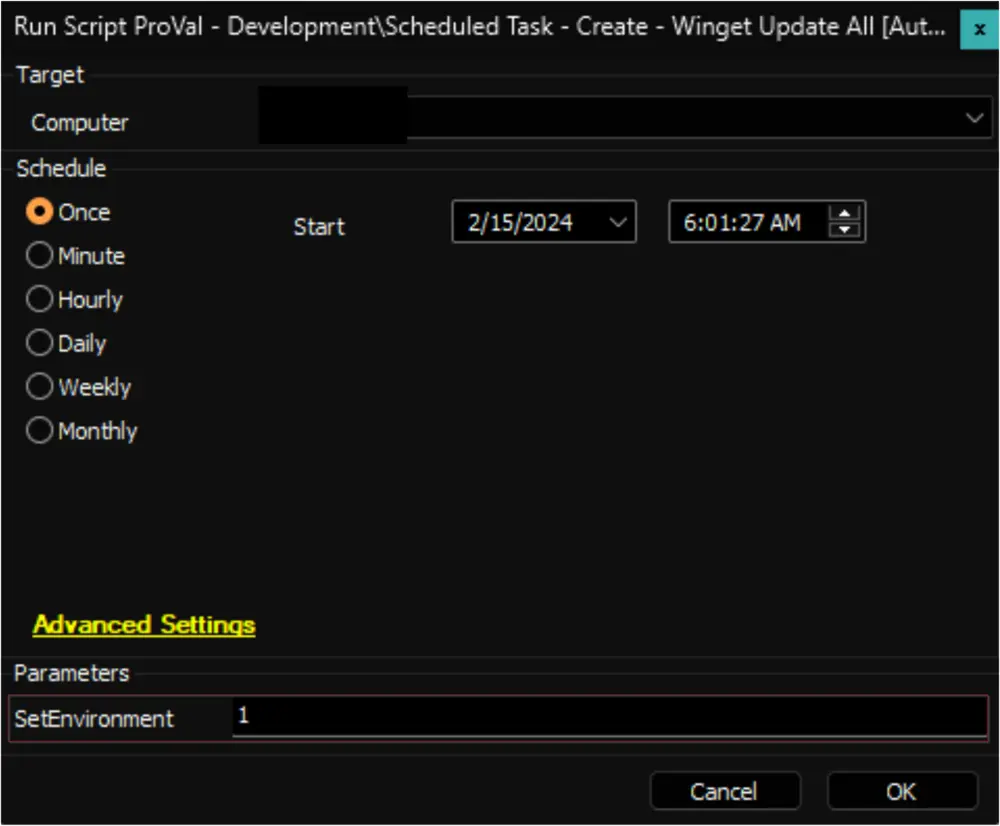
-
Configure the Extra Data Fields to initiate the solution as described in this document: Script - Scheduled Task - Create - Winget Update All [Autofix].
Note: Marking the client-level EDF
Winget Update All Task - Createwill initiate the solution for the client. -
Configure the solution as follows:
Navigate to Automation → Monitors within the CWA Control Center and set up the following:
-
CWM - Automate - Internal Monitor - Execute Script - Scheduled Task - Create - Winget Update All
- Configure with the alert template:
△ CUSTOM - Execute Script - Scheduled Task - Create - Winget Update All - Right-click and Run Now to start the monitor
- Configure with the alert template:
-
CWM - Automate - Internal Monitor - Execute Script - Scheduled Task - Delete - Winget Update All
- Configure with the alert template:
△ CUSTOM - Execute Script - Scheduled Task - Delete - Winget Update All - Right-click and Run Now to start the monitor
- Configure with the alert template:
-
FAQ
Q: How to disable the Winget Update All [Logged on User] task on the endpoints?
A:
-
For Environment-Level Changes
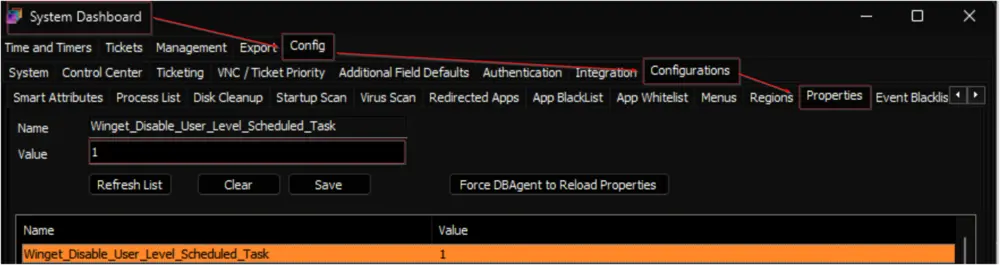
- Set the
Winget_Disable_User_Level_Scheduled_Tasksystem property to1.
- Follow the steps described in the Reset - Extra Data Field - Winget_update_all_task_created article for the Environment Level Changes.
- Set the
-
For Client-Level Changes
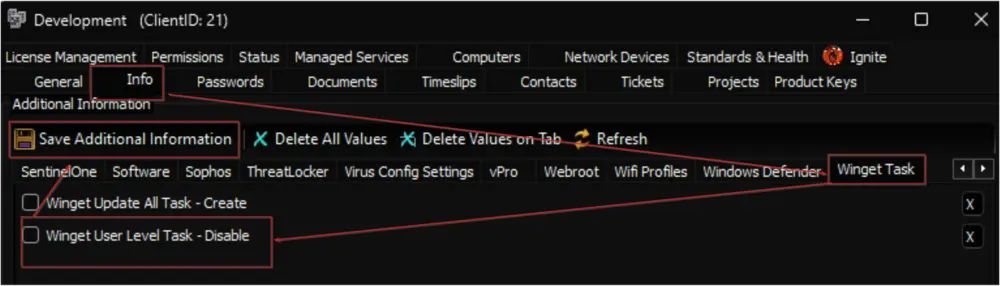
- Flag the Client-Level EDF
Winget User Level Task - Disable.
- Follow the steps described in the Reset - Extra Data Field - Winget_update_all_task_created article for the Client Level Changes.
- Flag the Client-Level EDF
Q: How to recreate the tasks on all Windows 10 and 11 computers in the environment?
A: Follow the steps described in the Reset - Extra Data Field - Winget_update_all_task_created article for the Environment Level Changes.
Q: How to recreate the tasks on all Windows 10 and 11 computers for a particular client?
A: Follow the steps described in the Reset - Extra Data Field - Winget_update_all_task_created article for the Client Level Changes.
Q: How to delete the tasks created on an endpoint?
A: Upon marking the Computer-Level EDF Winget Update All Task - Exclude, the Execute Script - Scheduled Task - Delete - Winget Update All internal monitor executes the Scheduled Task - Delete - Winget Update All [Autofix] script to remove the tasks from the endpoint.
Q: How to remove the tasks from all machines of a location?
A: Upon marking the Location-Level EDF Winget Update All Task - Exclude, the Execute Script - Scheduled Task - Delete - Winget Update All internal monitor executes the Scheduled Task - Delete - Winget Update All [Autofix] script to remove the tasks from all Windows 10 and 11 machines of the location.
Q: How to remove the tasks from all machines of a client?
A: Upon unmarking the Client-Level EDF Winget Update All Task - Create, the Execute Script - Scheduled Task - Delete - Winget Update All internal monitor executes the Scheduled Task - Delete - Winget Update All [Autofix] script to remove the tasks from all Windows 10 and 11 machines of the client.
Changelog
2025-04-10
- Initial version of the document