Browser - Homepage - Manage
Overview
Manages browser homepage settings for Chrome, Edge, Brave, and Firefox using signed agnostic scripts.
Sample Run
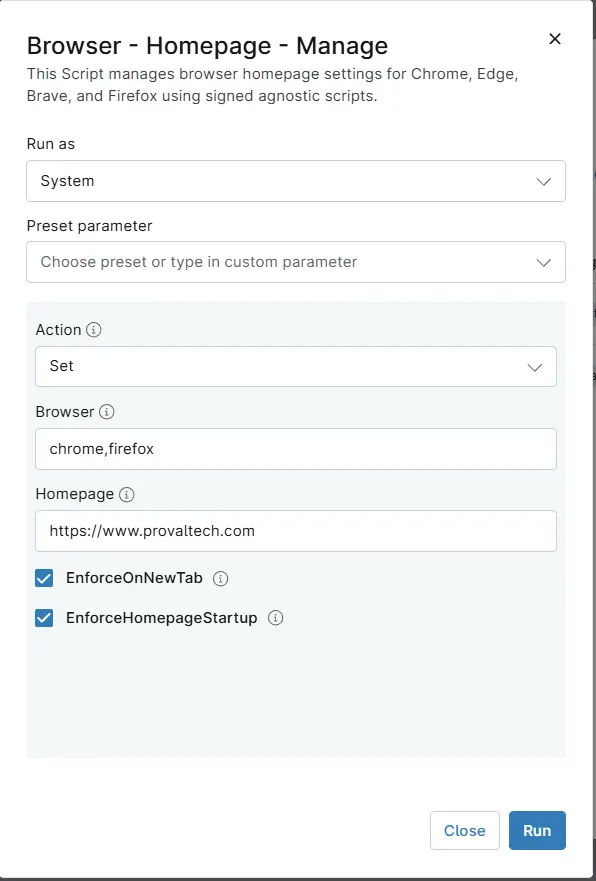
Dependencies
- Custom Field - cPVAL Browser HomePage Action
- Custom Field - cPVAL Browser
- Custom Field - cPVAL Browser Homepage
- Custom Field - cPVAL Browser EnforceOnNewTab
- Custom Field - cPVAL Browser EnforceHomepageStartup
- Solution - Browser - HomePage - Manage
Parameters
| Name | Example | Accepted Values | Required | Default | Type | Description |
|---|---|---|---|---|---|---|
| Action | Set | Set, Replace, Remove | False | - | DropDown | Specify desired action to be performed on Browsers Homepage. |
| Browser | chrome,edge | Chrome, Edge, Firefox, Brave | False | - | Text/String | Specify the browser for setting/removing the homepage. Only 'Chrome', 'Edge', 'Brave' and 'Firefox' are acceptable values. Each value should be separated by a comma without any additional spaces, e.g., chrome,firefox. |
| HomePage | https://www.provaltech.com | - | False | - | Text/String | The string value of the homepage to set in the browser. Useful only with the Set and Replace |
| EnforceOnNewTab | - | - | False | - | Checkbox | Select it to enforce the homepage on each new tab instead of the new tab page. Useful only with the Set and Replace and only works on Chromium Browsers (Brave,Chrome and Edge). |
| EnforceHomepageStartup | - | - | False | - | Checkbox | Select it to enforce the homepage to be the only open tab at the startup of the browser. Useful only with the Set and Replace |
Custom Fields
| Field Name | Type | Mandatory | Scope | Description |
|---|---|---|---|---|
| cPVAL Browser HomePage Action | DropDown | False | Organization, Location, Device | Select the desired action to be performed on Browsers Homepage. Set -> To set the Homepage; Remove -> To remove the Homepage; Replace -> To replace the current Homepage. |
| cPVAL Browser | Text | False | Organization, Location, Device | Specify the browser for setting/removing the homepage. Only 'Chrome', 'Edge', 'Brave' and 'Firefox' are acceptable values. Each value should be separated by a comma without any additional spaces, e.g., chrome,firefox. |
| cPVAL Browser Homepage | Text | False | Organization, Location, Device | The string value of the homepage to set in the browser. Useful only with the Set and Replace. |
| cPVAL Browser EnforceOnNewTab | Checkbox | False | Organization, Location, Device | Select it to enforce the homepage on each new tab instead of the new tab page. Useful only with the Set and Replace and only works on Chromium Browsers (Brave,Chrome and Edge). |
| cPVAL Browser EnforceHomepageStartup | Checkbox | False | Organization, Location, Device | Select it to force the homepage to be the only open tab at the startup of the browser. Useful only with the Set and Replace. |
Automation Setup/Import
Output
- Activity Details
Changelog
2026-10-01
- Initial version of the document