Reboot Nag [Restart Alert] [Prompter]
Overview
Manages and displays reboot prompts for Windows 10/11 systems based on pending reboot status or system uptime. The component runs once from Datto RMM — after that, the script manages itself automatically using scheduled tasks until the machine is rebooted. No recurring Datto jobs are needed.
The prompts support custom branding (icon and header image), localized messages (Dutch is auto-detected), and named substitution variables for dynamic content.
How It Works
What Happens When You Run the Component
- Datto evaluates conditions — The wrapper checks if the machine actually needs a reboot (pending reboot + uptime threshold, or high uptime alone, or manual override).
- If conditions are met, the wrapper downloads the agnostic prompting script and hands off control.
- The agnostic script takes over — It creates scheduled tasks to manage the entire prompt lifecycle autonomously.
- You do not need to run the component again — The script handles retries, postponements, reminders, and forced reboots on its own.
Default Prompt Flow (5 prompts, 4 hours apart)
| Prompt | Type | User Options | What Happens If Ignored |
|---|---|---|---|
| 1st – 4th | Regular | Postpone or Reboot Now | Treated as postpone; script reschedules for next interval |
| 5th | Final (scheduling) | Date/time picker + Schedule Reboot | Reboot is forced after timeout (default 15 min) |
Desktop_reboot_max_postpone controls the total number of prompts in the cycle (regular + final). With the default of 5: 4 regular prompts + 1 final = 5 total.
After the final prompt:
- If the user picks a time 15+ minutes in the future → reboot is scheduled, and a reminder appears 10 minutes before.
- If the user picks a time less than 15 minutes away → reboot is forced after the configured delay.
- If the prompt times out → reboot is forced immediately.
Automatic Behaviours
| Scenario | What Happens |
|---|---|
| User reboots on their own | On the next scheduled run, the script detects either fresh uptime (less than the interval) OR that LastBootUpTime is newer than the last prompt timestamp, cleans up all tasks and state, and exits. No further prompts. |
| User reboots after reminder / during shutdown countdown | Windows automatically cancels the pending shutdown /r timer. All tasks and state were already cleaned up when the shutdown was scheduled, so nothing remains to trigger a second reboot. |
| Machine is locked | Prompt is skipped; script reschedules for the next interval. If Desktop_reboot_max_missed_prompts is set, skipped prompts increment a counter until a forced reboot is triggered. |
| No user logged in | Prompt is skipped and rescheduled — unless Reboot_if_not_logged_in is enabled, in which case the machine reboots directly. |
| No user + install in progress | Even with auto-reboot enabled, the script defers if it detects an active installation (Windows Update, MSI, BITS, winget, etc.) and reschedules. |
| Weekend / Suppress window active | Prompt is skipped; script reschedules. If Desktop_reboot_during_suppress is enabled, unattended or forced reboots will bypass this restriction and proceed. |
| No internet | Script reschedules itself rather than failing. |
| Component run again while cycle is active | Exits without changes unless Desktop_reboot_force_reset is set. |
| Dutch-language user | Prompts automatically appear in Dutch for nl-NL and nl-BE display languages. |
Dependencies
Implementation
-
Download the component Reboot Nag [Restart Alert] [Prompter] from the attachments.
-
After downloading the attached file, click on the
Importbutton. -
Select the component just downloaded and add it to the Datto RMM interface.

Sample Run
To execute the component on a specific machine:
-
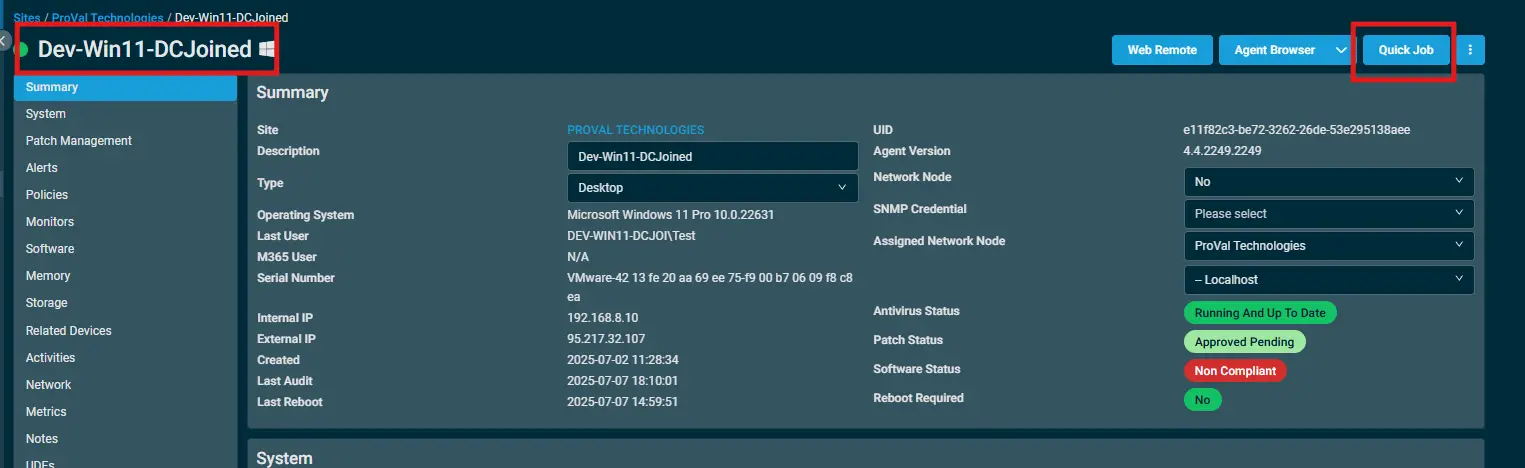
Select the machine you want to run the component on from Datto RMM.
-
Click on the
Quick Jobbutton.
-
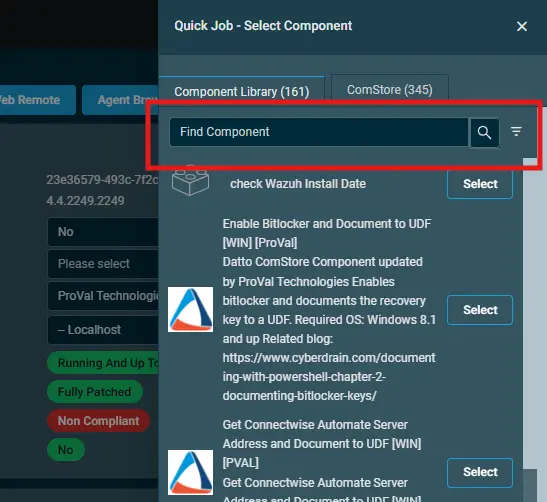
Search the component
Reboot Nag [Restart Alert] [Prompter]and click onSelect.
-
After selecting the component, configure the variables as described below.
Configuring the Variables
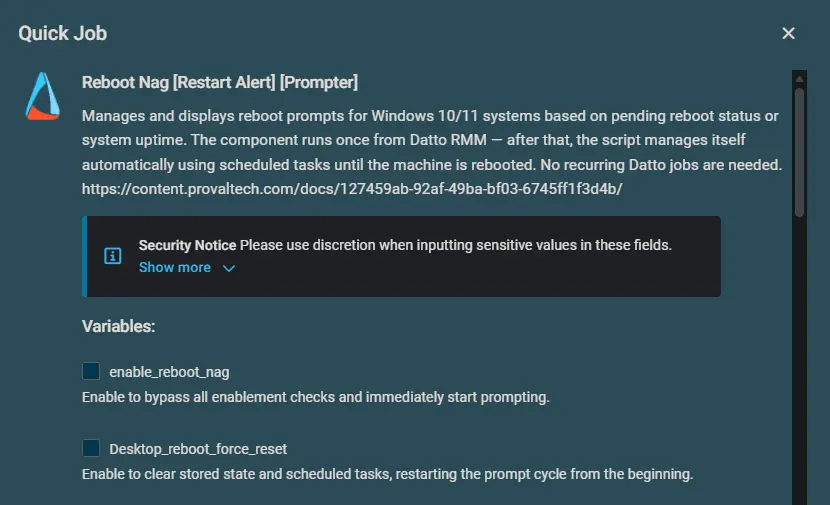
Enablement & Overrides:
- Set
enable_reboot_nagtoTrueto bypass all enablement checks and immediately start prompting. - Set
Desktop_reboot_force_resettoTrueto clear stored state and scheduled tasks, then restart the prompt cycle from the beginning.
Enablement Conditions:
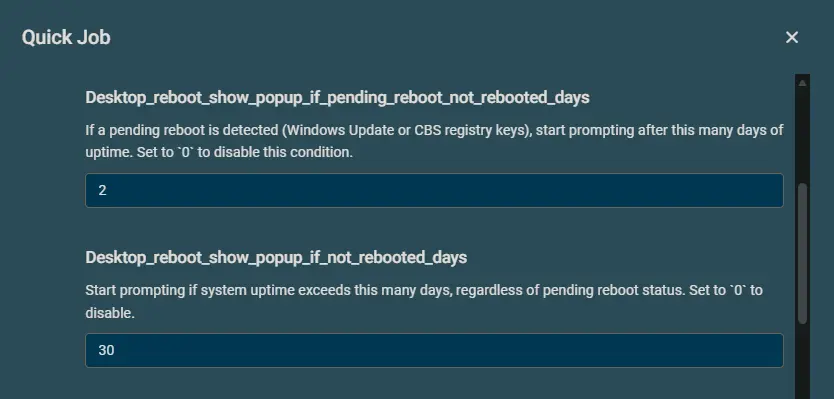
- Set
Desktop_reboot_show_popup_if_pending_reboot_not_rebooted_days— if a pending reboot is detected, prompts start after this many uptime days. Set to0to disable this condition. - Set
Desktop_reboot_show_popup_if_not_rebooted_days— prompts start if uptime exceeds this many days, regardless of pending reboot. Set to0to disable this condition.
Prompt Scheduling:
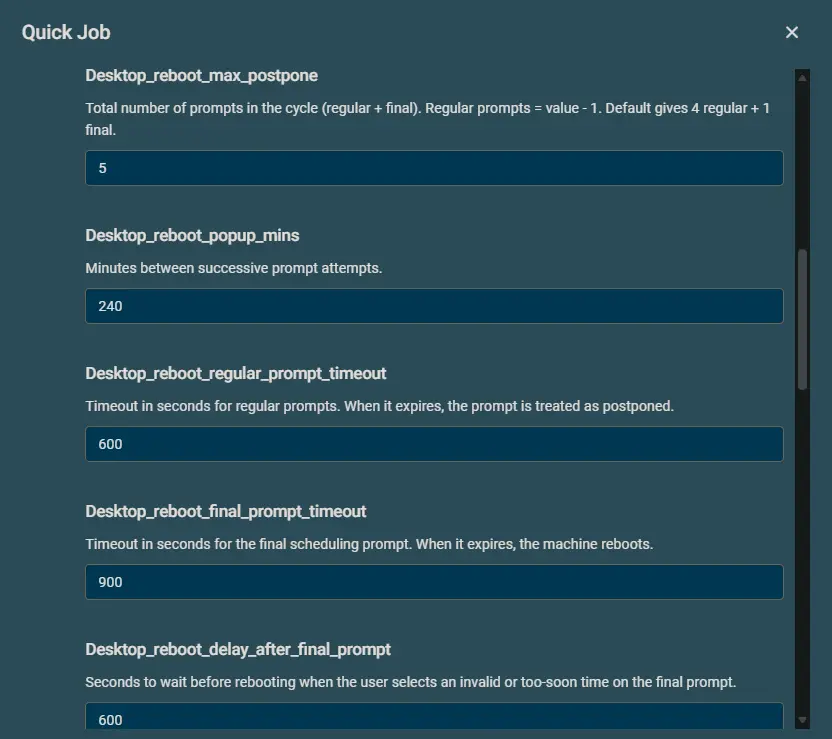
- Set
Desktop_reboot_max_postpone— total number of prompts in the cycle (regular + final). Regular prompts = value - 1. - Set
Desktop_reboot_popup_mins— minutes between successive prompt attempts. - Set
Desktop_reboot_regular_prompt_timeout— seconds before a regular prompt auto-closes (treated as postponed). - Set
Desktop_reboot_final_prompt_timeout— seconds before the final scheduling prompt auto-closes (triggers reboot). - Set
Desktop_reboot_delay_after_final_prompt— seconds to wait before rebooting when the user selects an invalid or too-soon time.
Behaviour Switches:
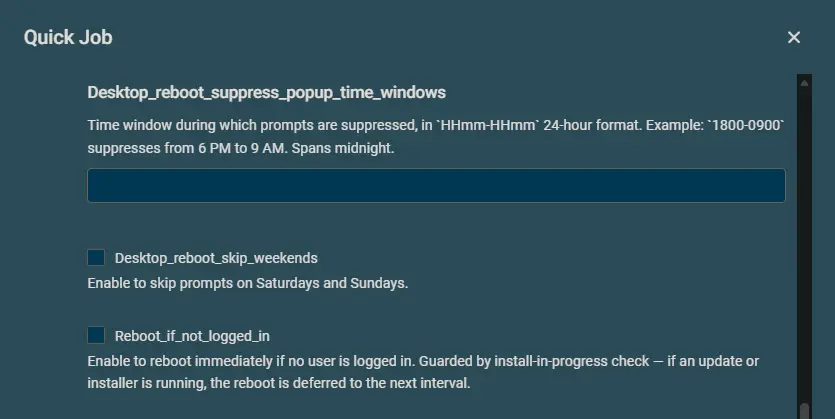
- Set
Desktop_reboot_suppress_popup_time_windows— time range when prompts are suppressed (for example,1800-0900for 6 PM to 9 AM). - Set
Desktop_reboot_skip_weekendstoTrueto skip prompts on Saturdays and Sundays. - Set
Reboot_if_not_logged_intoTrueto auto-reboot when no user is logged in (guarded by install-in-progress checks). - Set
Desktop_reboot_max_missed_prompts— number of consecutive skipped prompts (e.g., locked screen) before forcing a reboot without the GUI. Set to0to disable. - Set
Desktop_reboot_during_suppresstoTrueto allow unattended or forced reboots to proceed during suppress windows or weekends.
Branding:
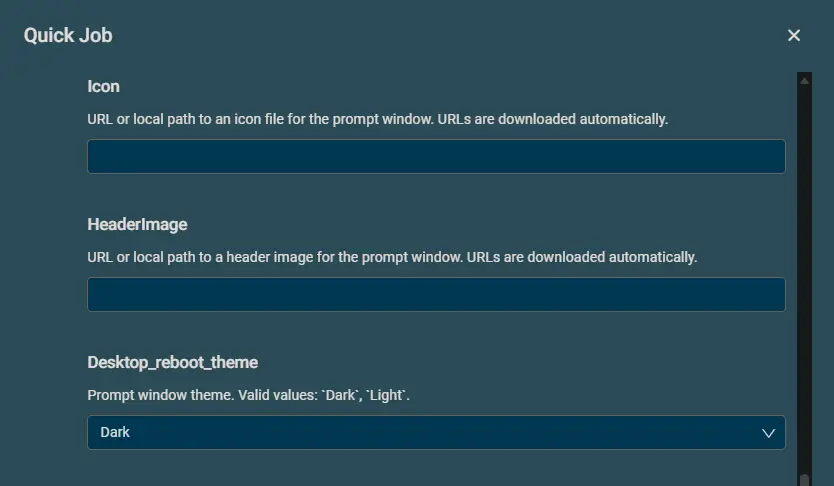
- Set
Icon— URL or local path for the prompt window icon. - Set
HeaderImage— URL or local path for the prompt header image. - Set
Desktop_reboot_theme— prompt window theme (DarkorLight). Default isDark.
Custom Messages (Optional):
-
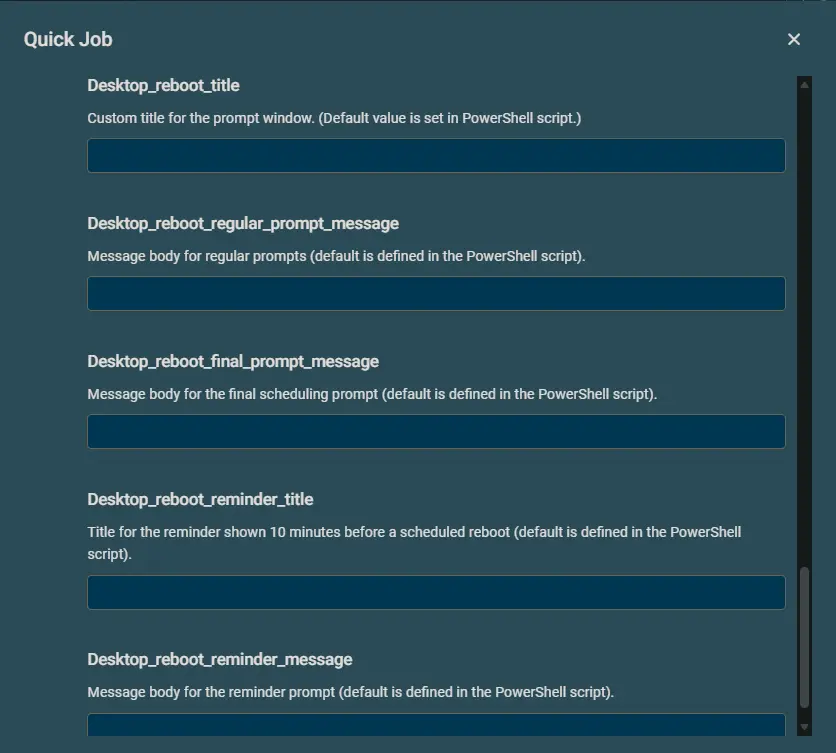
Set
Desktop_reboot_title— custom window title (leave blank for language-appropriate default). -
Set
Desktop_reboot_regular_prompt_message— custom message for regular prompts. -
Set
Desktop_reboot_final_prompt_message— custom message for the final scheduling prompt. -
Set
Desktop_reboot_reminder_title— custom title for the reminder before a scheduled reboot. -
Set
Desktop_reboot_reminder_message— custom message for the reminder prompt.
-
Click on
Runto initiate the component.
Sample Prompts (English)
Regular prompt (Postpone or Reboot Now):
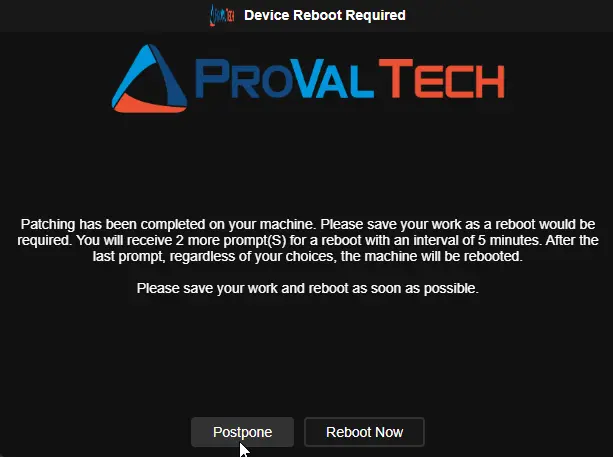
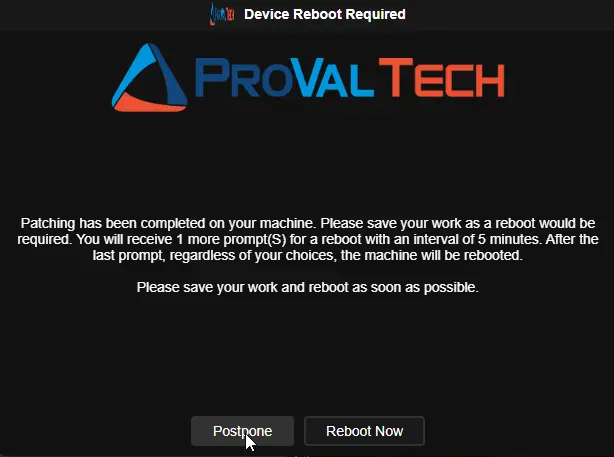
Regular prompt (Postpone or Reboot Now):
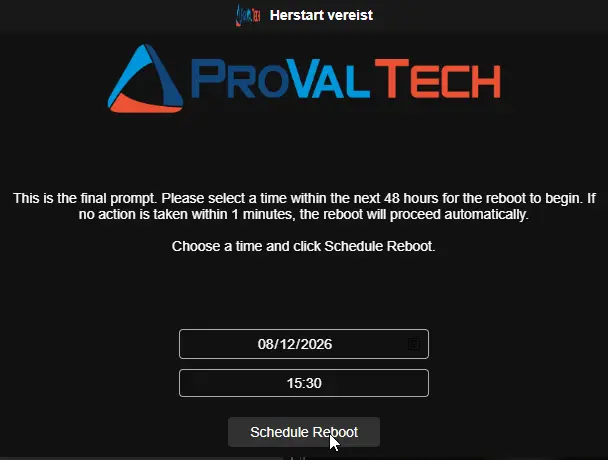
Final scheduling prompt (date/time picker):
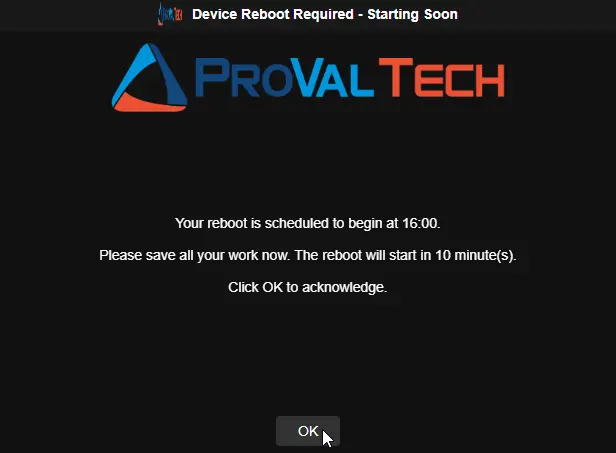
Reminder prompt (10 minutes before scheduled reboot):
Windows Shutdown Warning:
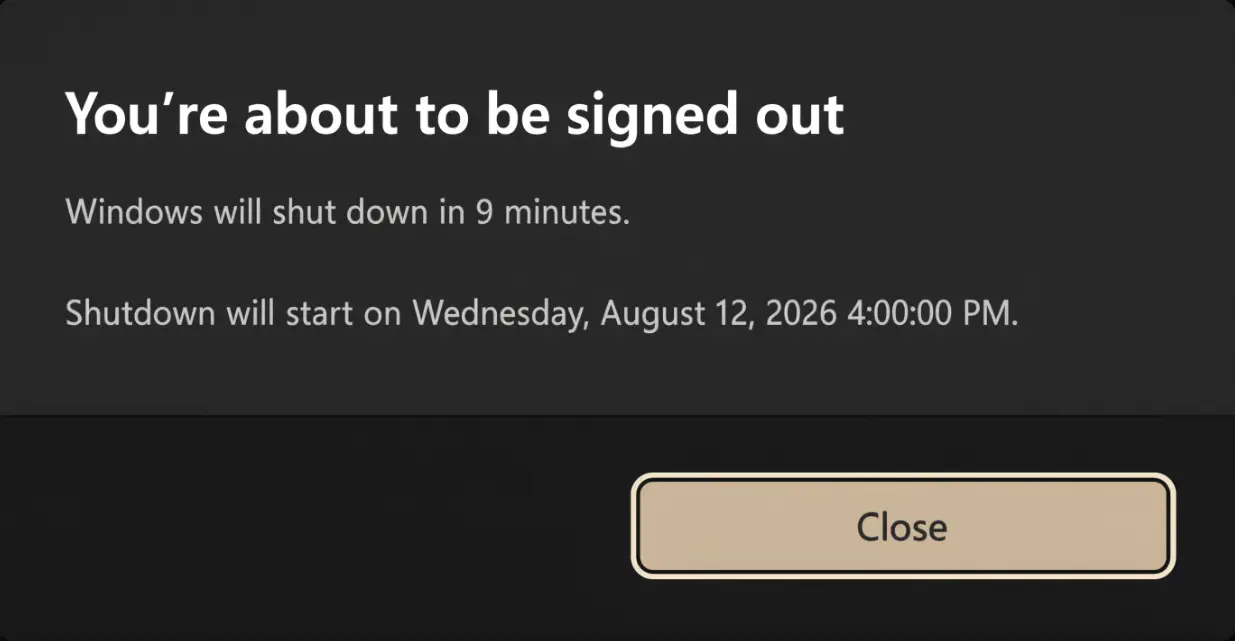
Note: The Windows shutdown warning says "shut down" — this is standard Windows behavior. Despite the wording, the machine will restart (not power off) because the script uses
shutdown /r(restart flag). This is a cosmetic quirk of the Windows notification and does not affect functionality.
Sample Prompts (Dutch)
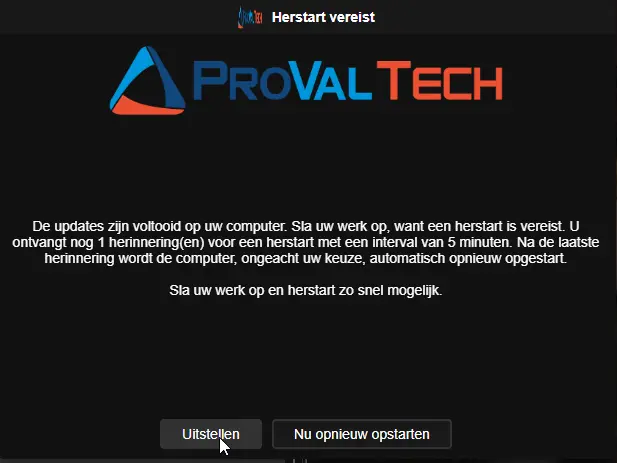
Regular prompt (Postpone or Reboot Now):
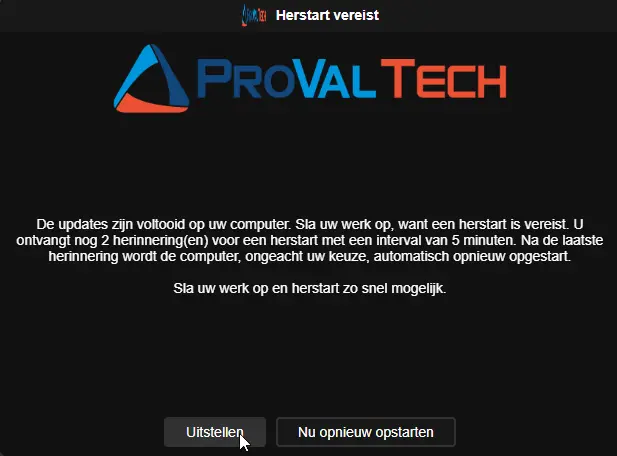
Regular prompt (Postpone or Reboot Now):
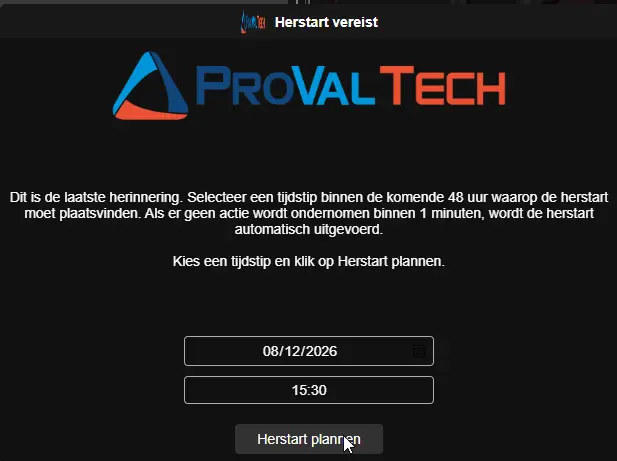
Final scheduling prompt (date/time picker):
Reminder prompt (10 minutes before scheduled reboot):
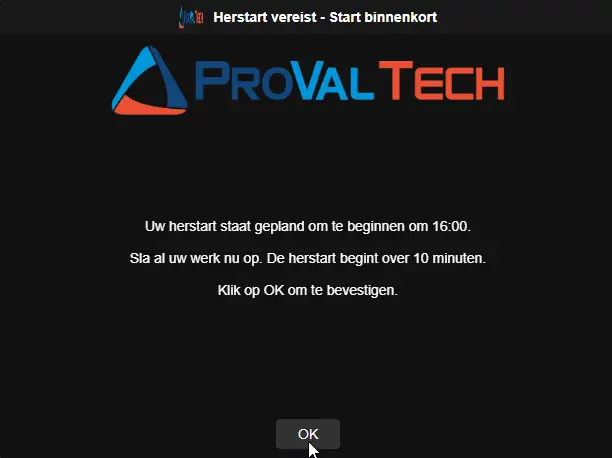
Windows Shutdown Warning:
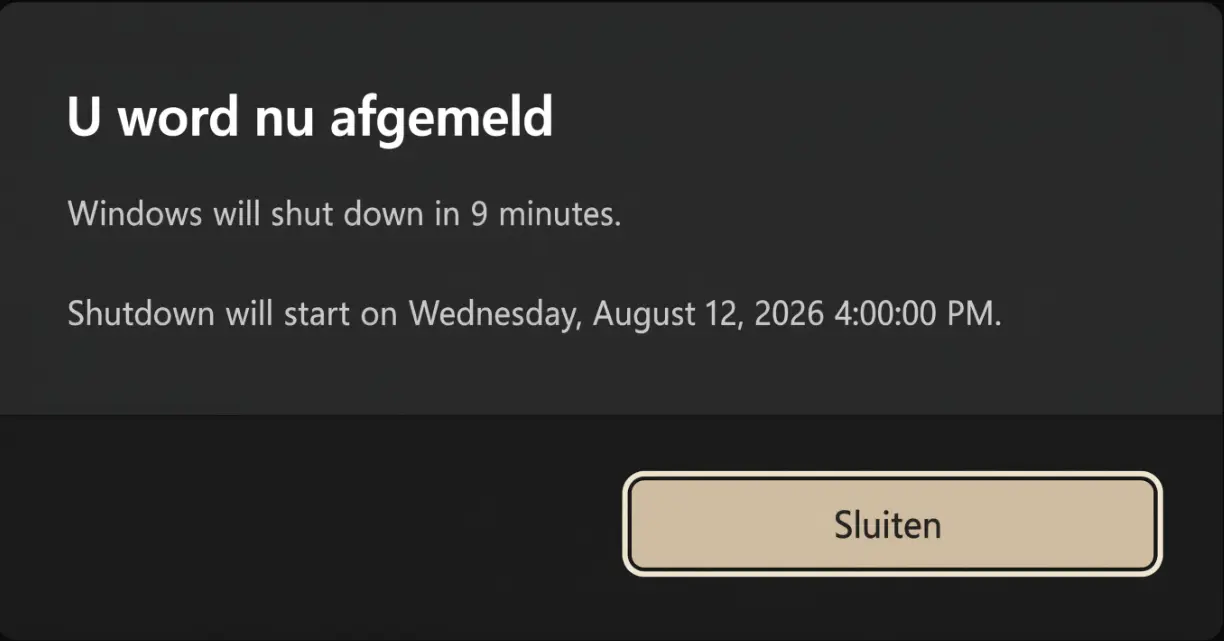
Note: The Windows shutdown warning says "shut down" — this is standard Windows behavior. Despite the wording, the machine will restart (not power off) because the script uses
shutdown /r(restart flag). This is a cosmetic quirk of the Windows notification and does not affect functionality.
Datto Variables
Enablement & Overrides
| Variable | Type | Default | Description |
|---|---|---|---|
enable_reboot_nag | Boolean | False | Enable to bypass all enablement checks and immediately start prompting. |
Desktop_reboot_force_reset | Boolean | False | Enable to clear stored state and scheduled tasks, restarting the prompt cycle from the beginning. |
Enablement Conditions
| Variable | Type | Default | Description |
|---|---|---|---|
Desktop_reboot_show_popup_if_pending_reboot_not_rebooted_days | String | 2 | If a pending reboot is detected (Windows Update or CBS registry keys), start prompting after this many days of uptime. Set to 0 to disable this condition. |
Desktop_reboot_show_popup_if_not_rebooted_days | String | 30 | Start prompting if system uptime exceeds this many days, regardless of pending reboot status. Set to 0 to disable. |
Prompt Scheduling
| Variable | Type | Default | Description |
|---|---|---|---|
Desktop_reboot_max_postpone | String | 5 | Total number of prompts in the cycle (regular + final). Regular prompts = value - 1. Default gives 4 regular + 1 final. |
Desktop_reboot_popup_mins | String | 240 | Minutes between successive prompt attempts. |
Desktop_reboot_regular_prompt_timeout | String | 600 | Timeout in seconds for regular prompts. When it expires, the prompt is treated as postponed. |
Desktop_reboot_final_prompt_timeout | String | 900 | Timeout in seconds for the final scheduling prompt. When it expires, the machine reboots. |
Desktop_reboot_delay_after_final_prompt | String | 600 | Seconds to wait before rebooting when the user selects an invalid or too-soon time on the final prompt. |
Behavior Switches
| Variable | Type | Default | Description |
|---|---|---|---|
Desktop_reboot_suppress_popup_time_windows | String | (not set) | Time window during which prompts are suppressed, in HHmm-HHmm 24-hour format. Example: 1800-0900 suppresses from 6 PM to 9 AM. Spans midnight. |
Desktop_reboot_skip_weekends | Boolean | False | Enable to skip prompts on Saturdays and Sundays. |
Reboot_if_not_logged_in | Boolean | False | Enable to reboot immediately if no user is logged in. Guarded by install-in-progress check — if an update or installer is running, the reboot is deferred to the next interval. |
Desktop_reboot_max_missed_prompts | String | 0 | Number of consecutive skipped prompt attempts (due to locked screen or no user logged in) before the GUI is bypassed and the reboot is forced. Set to 0 to disable forcing. |
Desktop_reboot_during_suppress | Boolean | False | Enable to allow an unattended or forced reboot to proceed inside a suppress time window or on a weekend. Interactive prompts are never shown during suppression. |
Branding
| Variable | Type | Default | Description |
|---|---|---|---|
Icon | String | (not set) | URL or local path to an icon file for the prompt window. URLs are downloaded automatically. |
HeaderImage | String | (not set) | URL or local path to a header image for the prompt window. URLs are downloaded automatically. |
Desktop_reboot_theme | Selection | Dark | Prompt window theme. Valid values: Dark, Light. |
Custom Messages
All message variables support substitution variables (see table below) and \n for line breaks.
| Variable | Type | Default | Description |
|---|---|---|---|
Desktop_reboot_title | String | (language-appropriate default) | Custom title for the prompt window (default is defined in the PowerShell script). |
Desktop_reboot_regular_prompt_message | String | (language-appropriate default) | Message body for regular prompts (default is defined in the PowerShell script). |
Desktop_reboot_final_prompt_message | String | (language-appropriate default) | Message body for the final scheduling prompt (default is defined in the PowerShell script). |
Desktop_reboot_reminder_title | String | (language-appropriate default) | Title for the reminder shown 10 minutes before a scheduled reboot (default is defined in the PowerShell script). |
Desktop_reboot_reminder_message | String | (language-appropriate default) | Message body for the reminder prompt (default is defined in the PowerShell script). |
Substitution Variables
Use these in any custom message. They are replaced with live values when the prompt is displayed.
| Variable | Description | Example Value |
|---|---|---|
%PromptsToSend% | Total number of prompts the user will receive | 5 |
%PromptsSent% | Number of prompts already shown | 2 |
%PromptsLeft% | Remaining prompts before the final one | 3 |
%PromptIntervalMinutes% | Interval between prompts in minutes | 240 |
%PromptIntervalHours% | Same interval in hours | 4 |
%RegularTimeoutSeconds% | Regular prompt timeout in seconds | 600 |
%RegularTimeoutMinutes% | Same timeout in minutes | 10 |
%FinalTimeoutSeconds% | Final prompt timeout in seconds | 900 |
%FinalTimeoutMinutes% | Same timeout in minutes | 15 |
%DelayAfterFinalSeconds% | Delay after final prompt in seconds | 600 |
%DelayAfterFinalMinutes% | Same delay in minutes | 10 |
%ScheduledRebootTime% | User-selected reboot time | 14:30 |
%MinutesUntilReboot% | Minutes until scheduled reboot | 10 |
%ComputerName% | Machine name | PC-OFFICE-01 |
%UserName% | Logged-in username | jsmith |
Notes:
- Variables that don't apply in a given context (e.g.
%ScheduledRebootTime%during a regular prompt) are replaced with an empty string. - Use
\nin any message to insert a line break in the prompt. - Unit conversion is automatic —
Desktop_reboot_popup_minsis in minutes so%PromptIntervalHours%divides by 60; timeout/delay values are in seconds so theMinutesvariants divide by 60.
Default Messages
When no custom message is set via site variables, the component uses language-aware defaults. Language is auto-detected from the logged-on user's UI language or the system locale.
Default English Messages
| Field | Default Text |
|---|---|
| Window Title | Device Reboot Required |
| Regular Prompt | Patching has been completed on your machine. Please save your work as a reboot would be required. You will receive %PromptsLeft% more prompt(S) for a reboot with an interval of %PromptIntervalMinutes% minutes. After the last prompt, regardless of your choices, the machine will be rebooted.\n\nPlease save your work and reboot as soon as possible. |
| Final Prompt | This is the final prompt. Please select a time within the next 48 hours for the reboot to begin. If no action is taken within %FinalTimeoutMinutes% minutes, the reboot will proceed automatically.\n\nChoose a time and click Schedule Reboot. |
| Reminder Title | Device Reboot Required - Starting Soon |
| Reminder Message | Your reboot is scheduled to begin at %ScheduledRebootTime%.\n\nPlease save all your work now. The reboot will start in %MinutesUntilReboot% minute(s).\n\nClick OK to acknowledge. |
Default Dutch Messages
Applied automatically when the user's UI language matches nl-NL or nl-BE.
| Field | Default Text |
|---|---|
| Window Title | Herstart vereist |
| Regular Prompt | De updates zijn voltooid op uw computer. Sla uw werk op, want een herstart is vereist. U ontvangt nog %PromptsLeft% herinnering(en) voor een herstart met een interval van %PromptIntervalMinutes% minuten. Na de laatste herinnering wordt de computer, ongeacht uw keuze, automatisch opnieuw opgestart.\n\nSla uw werk op en herstart zo snel mogelijk. |
| Final Prompt | Dit is de laatste herinnering. Selecteer een tijdstip binnen de komende 48 uur waarop de herstart moet plaatsvinden. Als er geen actie wordt ondernomen binnen %FinalTimeoutMinutes% minuten, wordt de herstart automatisch uitgevoerd.\n\nKies een tijdstip en klik op Herstart plannen. |
| Reminder Title | Herstart vereist - Start binnenkort |
| Reminder Message | Uw herstart staat gepland om te beginnen om %ScheduledRebootTime%.\n\nSla al uw werk nu op. De herstart begint over %MinutesUntilReboot% minuten.\n\nKlik op OK om te bevestigen. |
Real-Life Scenarios
Scenario 1: Default Configuration
Settings: All defaults (5 total prompts, 4 hours apart, pending reboot + 2 days or 30 days uptime).
What the user experiences:
- Machine has a pending Windows Update reboot and has been up for 3 days.
- 9:00 AM — Prompt 1 appears: "Please save your work... You will receive 3 more prompts." User clicks Postpone.
- 1:00 PM — Prompt 2 appears. User clicks Postpone.
- 5:00 PM — Prompt 3 appears. User clicks Reboot Now. Machine reboots. Cycle ends.
If the user had postponed all 4 regular prompts:
- 9:00 AM next day — Prompt 5 (final) appears with a date/time picker.
- User selects tomorrow at 8:00 AM → reboot is scheduled.
- 7:50 AM next day — Reminder appears: "Your reboot will start in 10 minutes."
- 8:00 AM — Machine reboots automatically.
Scenario 2: Quick Cycle for Critical Patches
Settings:
Desktop_reboot_max_postpone=2Desktop_reboot_popup_mins=60Desktop_reboot_final_prompt_timeout=600enable_reboot_nag=True
What the user experiences:
- 10:00 AM — Prompt 1 (regular) appears. User postpones.
- 11:00 AM — Prompt 2 (final) appears with date/time picker. If ignored for 10 minutes, machine reboots at 11:10 AM.
Scenario 3: Overnight Suppression with Weekend Skip
Settings:
Desktop_reboot_suppress_popup_time_windows=1800-0800Desktop_reboot_skip_weekends=True
What the user experiences:
- Prompts only appear between 8:00 AM and 6:00 PM, Monday through Friday.
- If a prompt is due at 7:00 PM Friday, it is skipped and rescheduled. The user won't see it until Monday morning after 8:00 AM.
Scenario 4: Unattended Machines (Kiosks, Shared PCs)
Settings:
Reboot_if_not_logged_in=TrueDesktop_reboot_popup_mins=120
What happens:
- If no user is logged in when the script runs, the machine reboots immediately.
- Exception: If Windows Update, an MSI installer, winget, BITS transfer, or similar is actively running, the reboot is deferred by 2 hours and checked again.
- If a user IS logged in, the normal prompt flow is used.
Scenario 5: User Reboots on Their Own
Settings: Any configuration.
What happens:
- Component runs at 10:00 AM. Prompt 1 shown. User postpones.
- User manually restarts the computer at 1:00 PM.
- Scheduled task fires at 2:00 PM. Script detects uptime (1 hour) is less than the interval (4 hours), concludes the machine was rebooted, removes all tasks and state, exits silently.
- No further prompts are shown.
Scenario 6: Custom Messages with Substitution Variables
Settings:
Desktop_reboot_regular_prompt_message=Hi %UserName%, your PC %ComputerName% needs a restart.\n\nYou have %PromptsLeft% reminders left.\nNext reminder in %PromptIntervalHours% hours.
What the user sees:
Hi jsmith, your PC PC-OFFICE-01 needs a restart.
You have 3 reminders left. Next reminder in 4 hours.
Scenario 7: User Reboots After Reminder or During Shutdown Countdown
Settings: Any configuration. User received the final prompt and scheduled a reboot.
What happens:
- 7:50 AM — Reminder prompt appears: "Your reboot will start in 10 minutes."
- Reminder task waits 60 seconds for the prompt to display, then issues
shutdown /r /f /t 540. - 7:55 AM — User saves work and manually restarts before the countdown expires.
- Windows automatically cancels the pending shutdown timer.
- All scheduled tasks and state were already cleaned up when the shutdown was issued — nothing remains to trigger a second reboot.
- Machine boots cleanly with no leftover artifacts.
Output
StdOut
A job status of Success is expected when conditions are met and the agnostic script launches successfully.
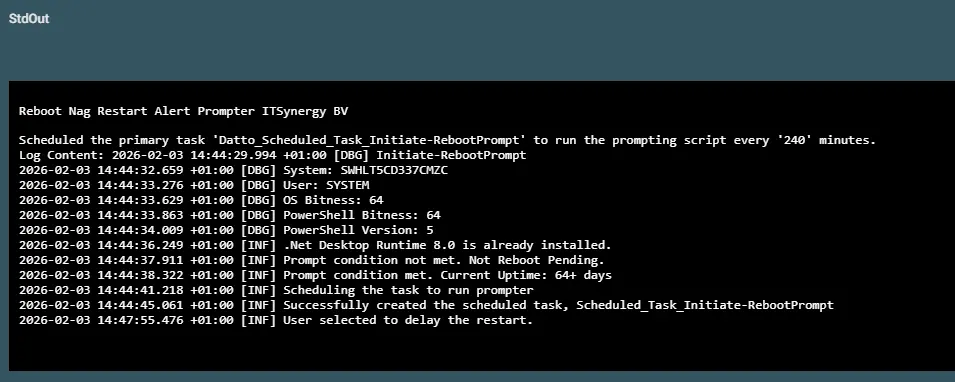
If conditions are not met (machine doesn't need a reboot), the output will indicate:
Reboot prompting conditions not met. Exiting without running the agnostic script.
This is normal behaviour — it means the machine is healthy and no prompt is needed.
StdErr StdErr is not expected under normal operation. If present, it typically indicates a signature validation failure or download error.
Artifacts Created
| Artifact | Path |
|---|---|
| OmniPrompt application | C:\ProgramData\_Automation\App\OmniPrompt\OmniPrompt.exe |
| SilentLauncher | C:\ProgramData\_Automation\App\OmniPrompt\SilentLauncher.exe |
| Persisted script | C:\ProgramData\_Automation\Script\Invoke-RebootWithPrompt\Invoke-RebootWithPrompt.ps1 |
| Log file | C:\ProgramData\_Automation\Script\Invoke-RebootWithPrompt\Invoke-RebootWithPrompt-log.txt |
| Error log | C:\ProgramData\_Automation\Script\Invoke-RebootWithPrompt\Invoke-RebootWithPrompt-error.txt |
| Scheduled task (main) | Scheduled_Task_Invoke-RebootPrompt |
| Scheduled task (reschedule) | Scheduled_Task_Invoke-RebootPrompt_Reschedule |
| Scheduled task (reminder) | Scheduled_Task_Invoke-RebootPrompt_Reminder |
Attachments
Reboot Nag [Restart Alert] [Prompter]
Changelog
2026-08-13
- Updated the implementation with the latest template.
- Replaced the .NET-based prompter with OmniPrompt, a native binary that requires no desktop runtime.
- Replaced legacy wrappers with SilentLauncher to eliminate console window flashing and bypass EDR/AV blocks.
- Added
Desktop_reboot_max_missed_promptsto force a reboot if a machine repeatedly misses prompts. - Added
Desktop_reboot_during_suppressto allow unattended or forced reboots to bypass suppress windows and weekends.
2026-06-17
- Fixed double-reboot bug: script now tracks
LastPromptSentTimeand compares againstLastBootUpTimeto detect reboots that occurred after the most recent prompt (including reminder and final prompts) - Replaced
Start-Sleep+Restart-Computerin the reminder path withshutdown /r /f /t 540— Windows auto-cancels the pending shutdown if the user reboots manually, eliminating duplicate reboots - Reminder task now waits 60 seconds for the prompt to display before issuing the shutdown command
- Corrected
Desktop_reboot_max_postponesemantics: value is the total prompt count (regular + final), not just the regular count - Added post-reboot detection: script now checks system uptime on rescheduled runs and cleans up automatically if the machine was already rebooted (no more unnecessary prompts after a manual reboot)
- Added install-in-progress guard: when no user is logged in and auto-reboot is enabled, the script checks for active installations (Windows Update, MSI, BITS, winget, etc.) and defers the reboot if one is found
- Added named substitution variables (
%PromptsLeft%,%PromptIntervalMinutes%,%ComputerName%, etc.) for custom messages - Added
\nsupport for line breaks in all message strings - Added
Desktop_reboot_delay_after_final_promptvariable (seconds to wait before rebooting after invalid/too-soon time selection) - Added
Desktop_reboot_title,Desktop_reboot_regular_prompt_message,Desktop_reboot_final_prompt_message,Desktop_reboot_reminder_title, andDesktop_reboot_reminder_messagevariables for full message customization - Added
enable_reboot_nagvariable to bypass all conditions and immediately start prompting - Added
Desktop_reboot_force_resetvariable to clear state and restart the prompt cycle - Upgraded from .NET 8 to .NET Desktop Runtime 10
- Replaced Strapper-based language detection in the wrapper with direct HKU registry lookup
- Moved enablement check before heavy operations (download, signature validation) for faster exit when conditions are not met
- Updated the script to use the agnostic script Invoke-RebootWithPrompt
2026-03-23
- Code Signed the PowerShell script.
- Converted
IconandHeaderImageto run-time variables. - Updated .Net8 Desktop Runtime installation logic to install the latest available version.
2026-03-17
- Initial version of the document