Windows - System - Rename
Summary
This script can be used to rename a windows machine. It does not automatically reboots the machine, reboot will be required to complete the renaming process.
The script requires Domain Admin credentials to authenticate in order to rename the domain joined Windows computers. This can be ignored if the computer is not domain joined.
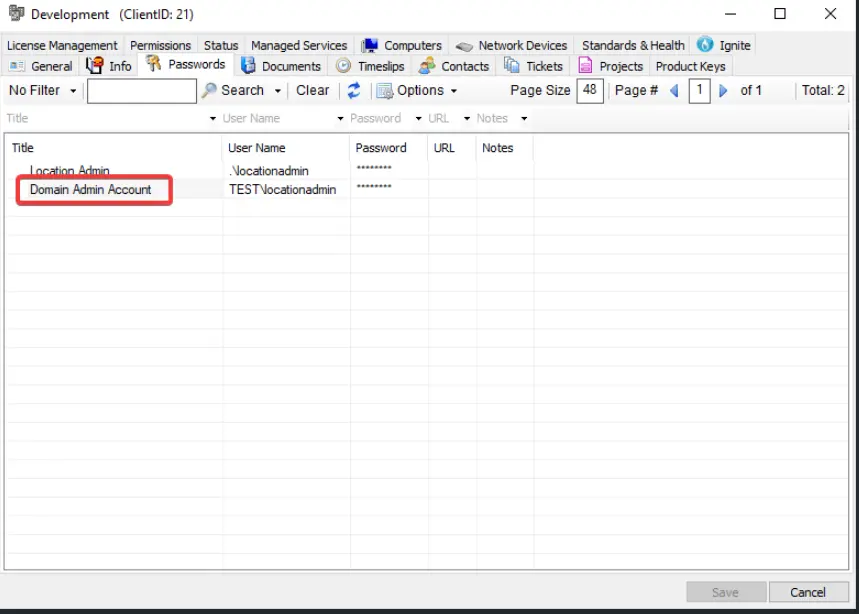
Please ensure that the Domain Admin credentials are stored in the client’s Passwords tab. When running the script, use the title of the stored password entry as the User Parameter DomainPasswordTitle so the script can retrieve and use the correct credentials during execution.
Files Hash
- File Name:
C:\ProgramData\_Automation\Script\Rename-Machine\Rename-Machine-AI.ps1 - File Hash (Sha256):
C69B89A5074434D326D84F46279110F44D018BA493BEF0486B45D7F9C6784B83 - File Hash (MD5):
DDFAF9C7518B651C6A352AD63610DBCD
Dependencies
Sample Run
DomainPasswordTitle to be used from:
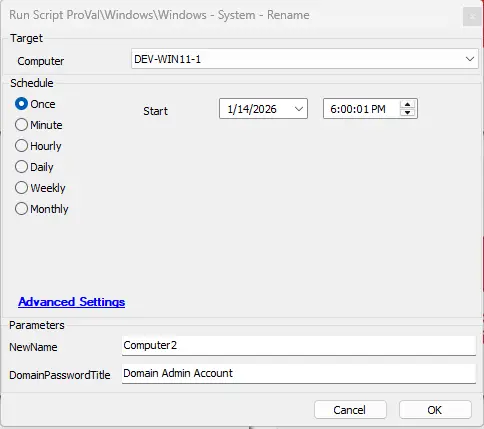
Fill in the NewName and DomainPasswordTitle while running the script:
User Parameters
| Name | Example | Required | Description |
|---|---|---|---|
| NewName | COMPUTER2 | True | The new name to set on the target machine. |
| DomainPasswordTitle | Domain Admin Account | False | The title of the password entry to use for the username and password for domain authentication. The password entry must be under the same Client as the target machine. |
Output
- Script Logs
Changelog
2026-01-16
- Updated the document and script with the latest document URL.
2026-01-14
- Initial version of the document