Manage Unknown ScreenConnect Client [Macintosh]
Overview
This automation audits all installed ScreenConnect Client instances on MacOS and compares them against approved identifiers.
Approved identifiers can come from:
- cPVAL Whitelisted ScreenConnect Instances
- Runtime variable
Allowed Instances(takes precedence over the custom field when set)
Monitoring behavior is controlled by cPVAL Unknown ScreenConnect Monitoring:
Audit OnlyAudit and AlertAutofix and Alert on Failure
During each run, the automation updates:
- cPVAL Installed ScreenConnect Instances (WYSIWYG details)
- cPVAL Unknown ScreenConnect Installed (checkbox status)
If cPVAL Unknown ScreenConnect Monitoring is blank, the automation defaults to Audit Only.
If both Allowed Instances and cPVAL Whitelisted ScreenConnect Instances are blank, no instances are considered approved.
Related automation:
Related Compound Conditions:
Sample Run
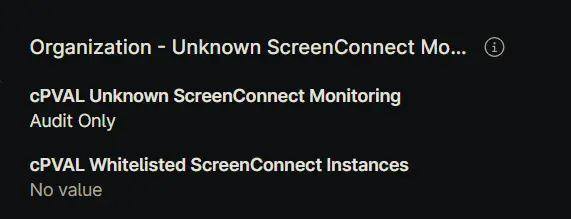
Example 1: Audit only with empty whitelist
- Custom Field: cPVAL Unknown ScreenConnect Monitoring =
Audit Only - Custom Field: cPVAL Whitelisted ScreenConnect Instances =
<blank>
- Allowed Instances =
<blank>
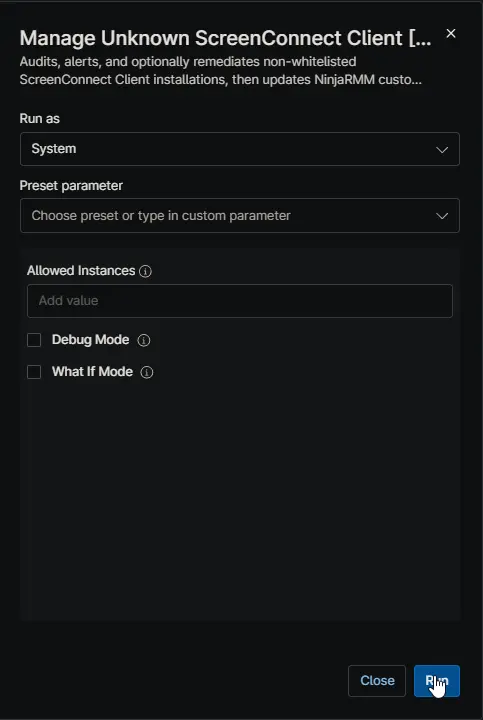
Expected Outcome: All detected ScreenConnect instances are marked unknown. cPVAL Unknown ScreenConnect Installed is checked. No removal and no alert exit.
Example 2: Audit and alert with partial whitelist
- Custom Field: cPVAL Unknown ScreenConnect Monitoring =
Audit and Alert - Custom Field: cPVAL Whitelisted ScreenConnect Instances = one approved identifier
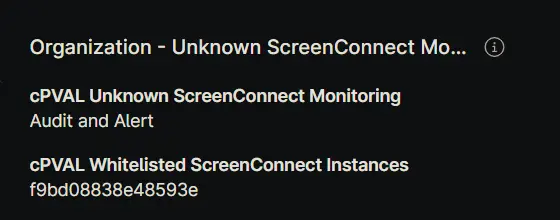
- Allowed Instances =
<blank>
Expected Outcome: Approved rows show Whitelisted and unknown rows show Unknown. Alert output is returned and the script exits non-zero if any unknown instance exists.
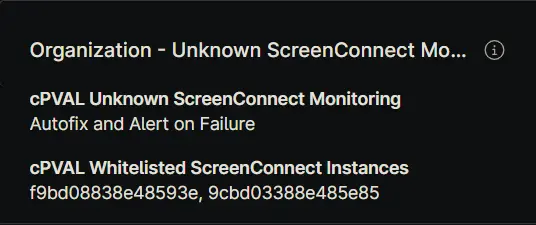
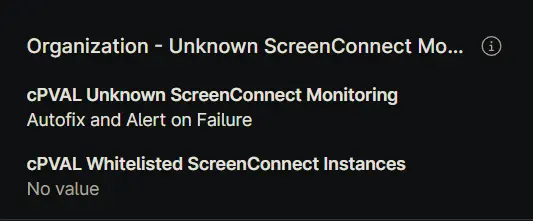
Example 3: Autofix with custom field whitelist
- Custom Field: cPVAL Unknown ScreenConnect Monitoring =
Autofix and Alert on Failure - Custom Field: cPVAL Whitelisted ScreenConnect Instances = approved identifiers
- What If Mode =
false
Expected Outcome: Unknown instances are targeted for uninstall, then the device is re-audited. cPVAL Installed ScreenConnect Instances is updated with post-remediation results. Alert output occurs only if unknown instances remain.
Example 4: Autofix with runtime override
- Custom Field: cPVAL Unknown ScreenConnect Monitoring =
Autofix and Alert on Failure - Custom Field: cPVAL Whitelisted ScreenConnect Instances =
<blank>
- Allowed Instances = approved identifiers
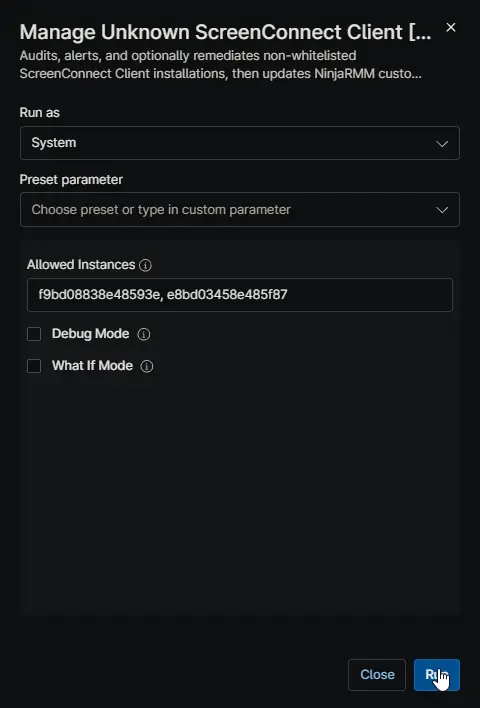
Expected Outcome: Allowed Instances overrides the blank custom field. Matching instances are preserved, and non-matching instances are targeted for uninstall.
Example 5: What-if preview before enforcement
- Custom Field: cPVAL Unknown ScreenConnect Monitoring =
Autofix and Alert on Failure
- Debug Mode: =
true - What If Mode =
true
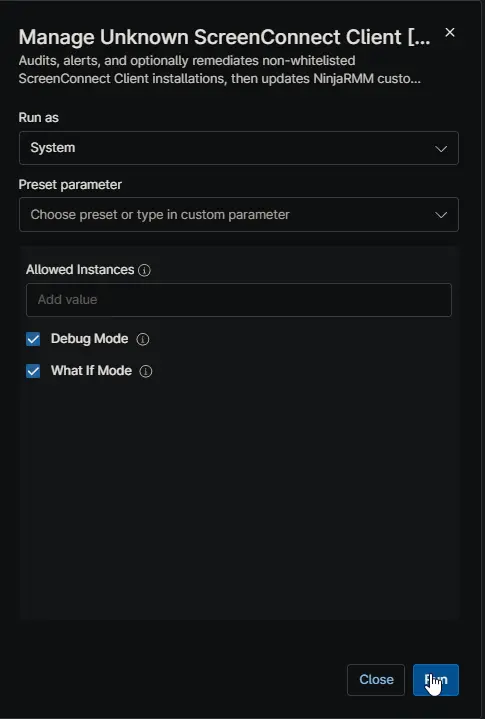
Expected Outcome: No uninstall or cleanup occurs. Output shows detailed logs and what would be removed. cPVAL Installed ScreenConnect Instances is updated with WhatIf action text.
Dependencies
- Custom Field: cPVAL Unknown ScreenConnect Monitoring
- Custom Field: cPVAL Whitelisted ScreenConnect Instances
- Custom Field: cPVAL Installed ScreenConnect Instances
- Custom Field: cPVAL Unknown ScreenConnect Installed
- Solution: Unknown ScreenConnect Monitoring
Parameters
| Name | Example | Accepted Values | Required | Default | Type | Description |
|---|---|---|---|---|---|---|
Allowed Instances | c6bd08847e48343e,7df67d57637499f5 | Comma-separated identifiers | No | blank | String/Text | Optional runtime list of approved identifiers. When set, it overrides cPVAL Whitelisted ScreenConnect Instances. |
Debug Mode | true | true/false, 1/0, yes/no, on/off | No | blank | Checkbox | Enables additional debug logging only. Does not change detection, alerting, or remediation logic. |
What If Mode | true | true/false, 1/0, yes/no, on/off | No | blank | Checkbox | Dry-run mode for autofix. Shows what would be removed without uninstalling or deleting anything. |
Custom Fields
| Custom Field | Field Name | Scope | Type | Access | Used As |
|---|---|---|---|---|---|
| cPVAL Unknown ScreenConnect Monitoring | cpvalUnknownScreenconnectMonitoring | Organization, Location, Device | Drop-down | Read | Selects enforcement mode for audit, alerting, and remediation behavior. |
| cPVAL Whitelisted ScreenConnect Instances | cpvalWhitelistedScreenconnectInstances | Organization, Location, Device | Text | Read | Stores approved ScreenConnect identifiers used for allowlist matching. |
| cPVAL Installed ScreenConnect Instances | cpvalInstalledScreenconnectInstances | Device | WYSIWYG | Write | Stores current-run details for detected instances, status, actions, and timestamps. |
| cPVAL Unknown ScreenConnect Installed | cpvalUnknownScreenconnectInstalled | Device | Checkbox | Write | Set to checked when any unknown instance is detected in the current scan. |
Available Options and Behavior
cPVAL Unknown ScreenConnect Monitoring (Drop-down)
| Option | Behavior |
|---|---|
Audit Only | Audits installed instances and updates custom fields only. No remediation and no alert failure exit. |
Audit and Alert | Audits and updates custom fields. Returns alert output and non-zero exit when unknown instances are detected. |
Autofix and Alert on Failure | Attempts uninstall of unknown instances, re-audits, updates custom fields, and alerts only when unknown instances remain. |
If this field is blank or invalid, the script uses Audit Only.
cPVAL Unknown ScreenConnect Installed (Checkbox)
| Value | Meaning |
|---|---|
1 (checked / true) | One or more unknown ScreenConnect instances were detected in the latest run. |
0 (unchecked / false) | No unknown ScreenConnect instances were detected in the latest run. |
cPVAL Installed ScreenConnect Instances WYSIWYG Columns
| Column Name | Description |
|---|---|
Name | Detected installed ScreenConnect Client display name. |
DisplayVersion | Installed version from uninstall registry details when available. |
InstallDate | Install date normalized to yyyy-MM-dd when parseable. |
Whitelist Status | Whitelisted when identifier match is found; Unknown otherwise. |
Action / Result | Audit-only status, remediation attempt result, or post-remediation verification status. |
DataCollectionTime | Timestamp when the report row was generated for the current script phase. |
Automation Setup/Import
Output
- Activity Details
- Custom field updates to cPVAL Installed ScreenConnect Instances
- Custom field updates to cPVAL Unknown ScreenConnect Installed
- Alert-oriented output in
Audit and AlertandAutofix and Alert on Failurewhen unknown instances are present
Changelog
2026-04-24
- Added additional checks for the instances installed in directories other than
/applications/
2026-04-09
- Initial version of the document