Users - LogOff
Summary
Logs off specified users or all active sessions from a Windows system. It provides flexibility in managing user sessions and can be executed with different parameters to target individual users or the entire user base.
Sample Run
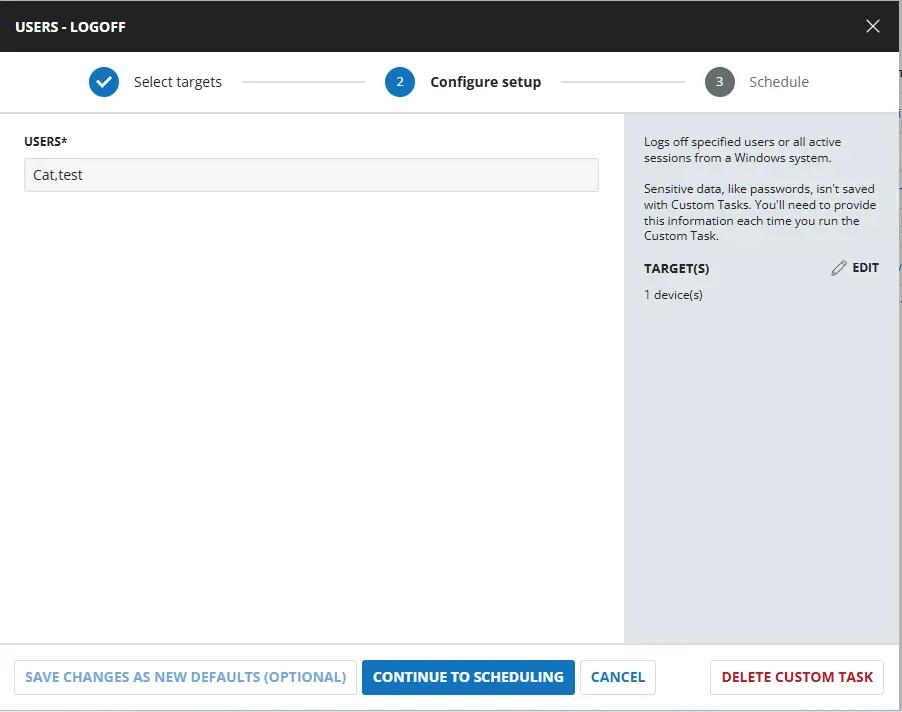
User Parameters
| Name | Example | Accepted Values | Required | Default | Type | Description |
|---|---|---|---|---|---|---|
| Users | Calve,Test,All | user names separated by , or use ALL to log off all users | False | ALL | Text | The target user, multiple users, or all users to log off the machine. By default it will Log Off All users. |
Task Creation
Script Details
Step 1
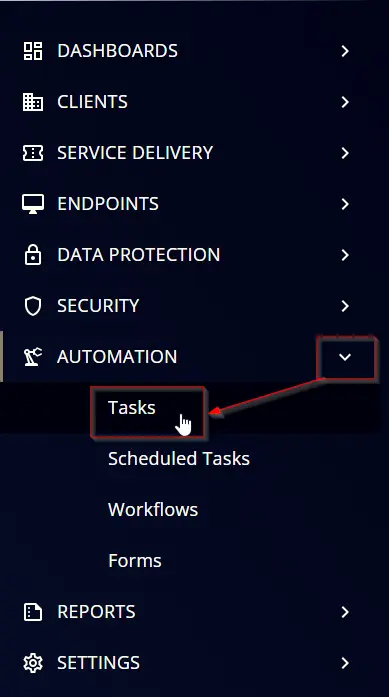
Navigate to Automation ➞ Tasks
Step 2
Create a new Script Editor style task by choosing the Script Editor option from the Add dropdown menu
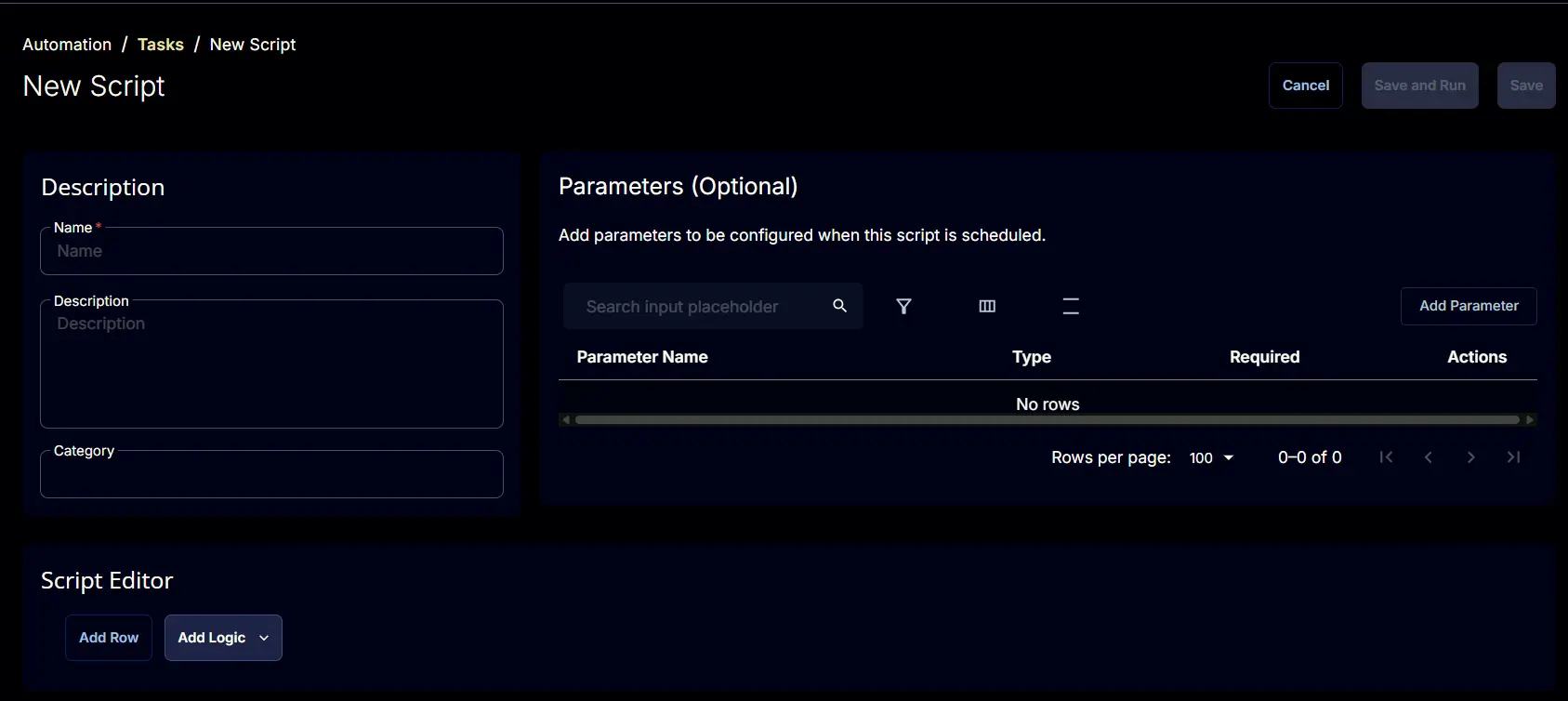
The New Script page will appear on clicking the Script Editor button:
Step 3
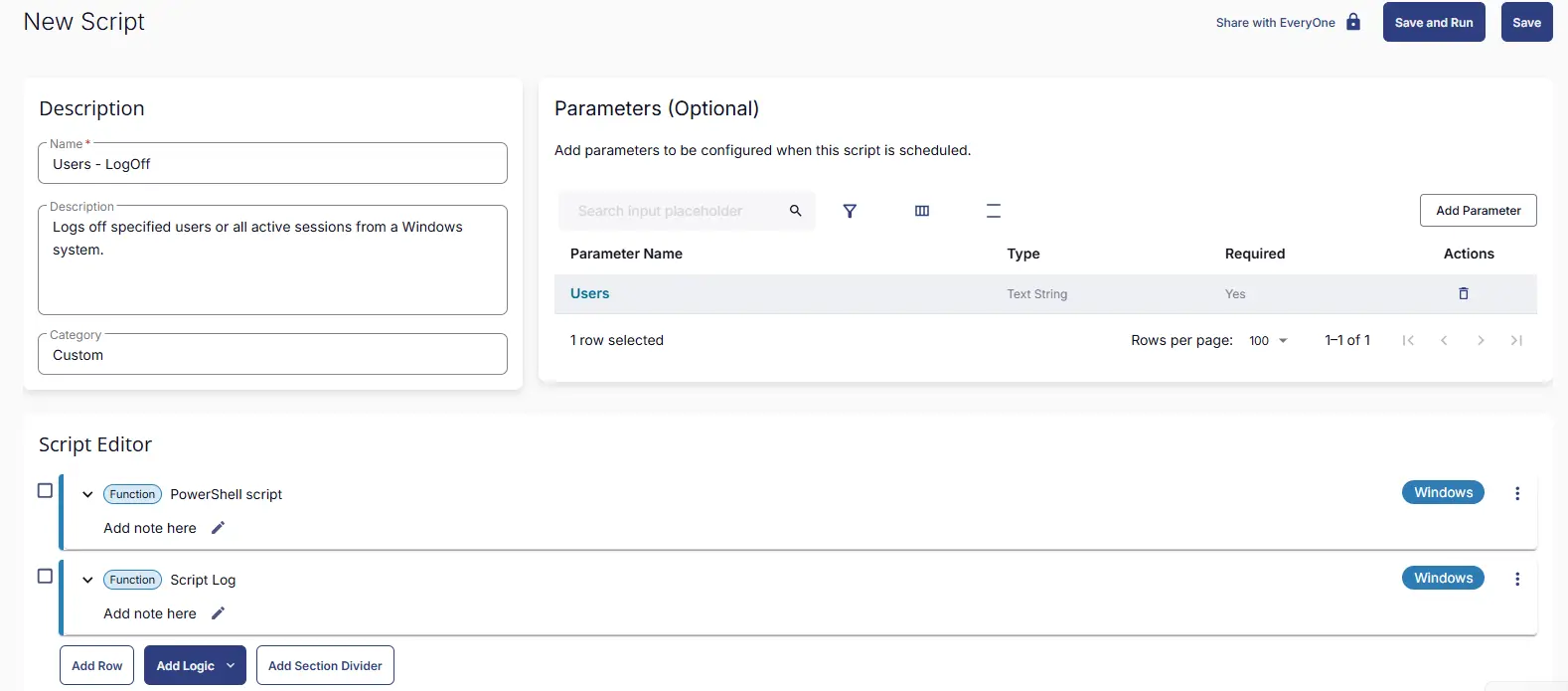
Fill in the following details in the Description section:
Name: Users - LogOff
Description: Logs off specified users or all active sessions from a Windows system.
Category: Custom
Parameters
Locate the Add Parameter button on the right-hand side of the screen and click on it to create a new parameter.
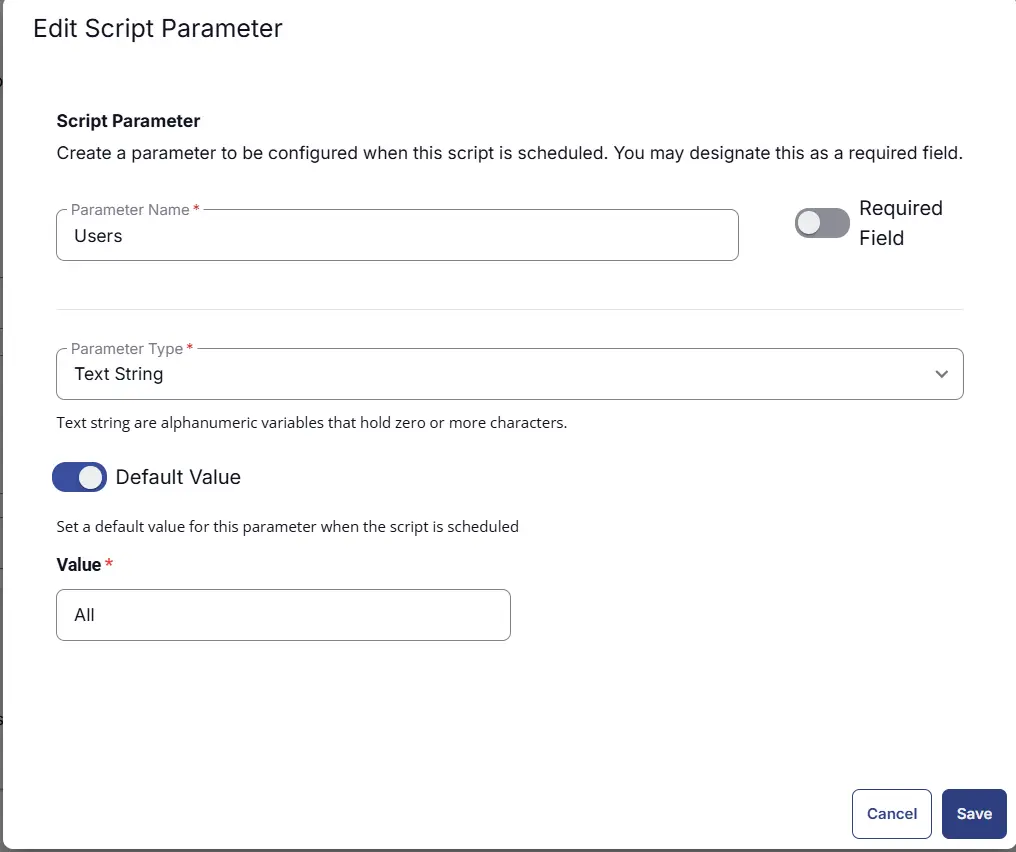
The Add New Script Parameter page will appear on clicking the Add Parameter button.
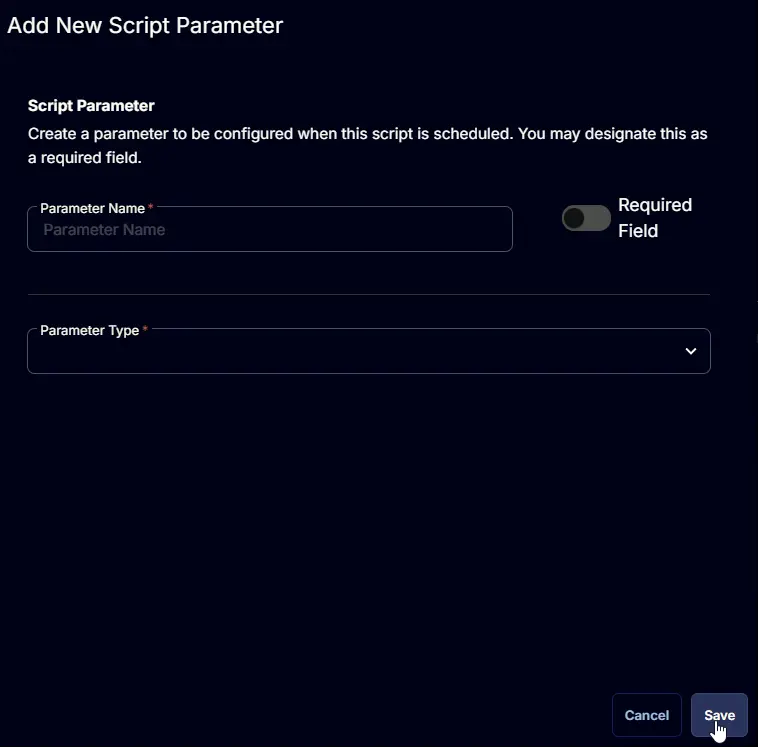
- Set
Usersin theParameter Namefield. - Select
Text Stringfrom theParameter Typedropdown menu. - Set
Allas Default Value. - Click the
Savebutton.
Script Editor
Click the Add Row button in the Script Editor section to start creating the script
A blank function will appear:
Row 1 Function: PowerShell Script
Search and select the PowerShell Script function.
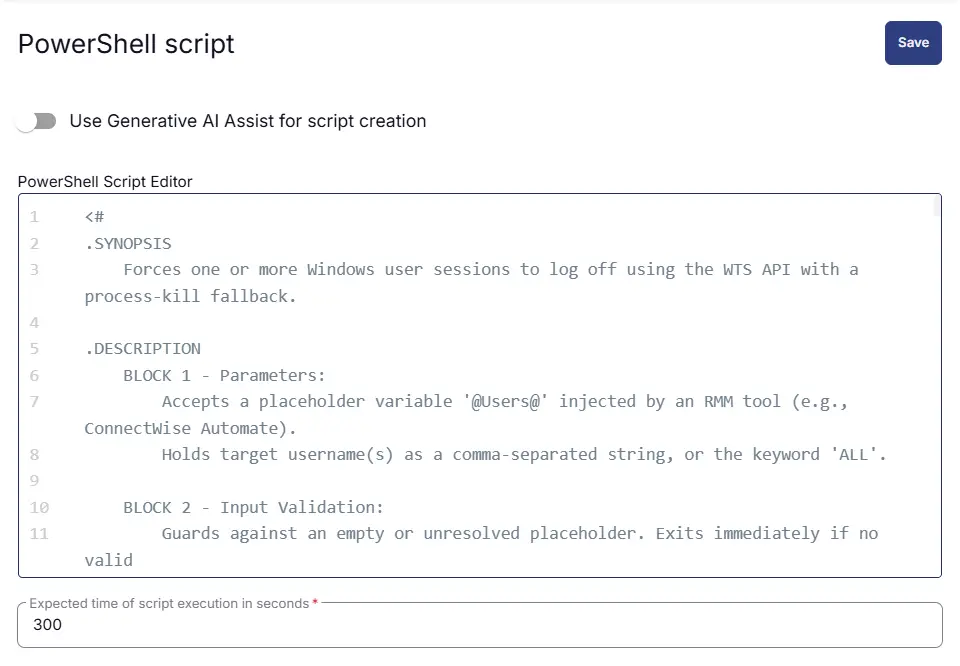
The following function will pop up on the screen:
Paste in the following PowerShell script and set the Expected time of script execution in seconds to 300 seconds. Click the Save button.
<#
.SYNOPSIS
Forces one or more Windows user sessions to log off using the WTS API with a process-kill fallback.
.DESCRIPTION
BLOCK 1 - Parameters:
Accepts a placeholder variable '@Users@'. Holds target username(s) as a comma-separated string, or the keyword 'ALL'.
BLOCK 2 - Input Validation:
Guards against an empty or unresolved placeholder. Exits immediately if no valid
user input is provided to prevent unintended logoffs.
BLOCK 3 - Input Normalization:
Splits the comma-separated input into an array, strips surrounding whitespace and
stray single-quotes from each entry, and removes empty elements.
BLOCK 4 - WTS API Setup:
Defines a C# class 'WTS' inline using Add-Type, importing the following functions
from wtsapi32.dll:
- WTSOpenServer / WTSCloseServer : Opens/closes a handle to the local terminal server.
- WTSEnumerateSessions : Lists all active sessions on the machine.
- WTSQuerySessionInformation : Retrieves the username for a given session ID.
- WTSLogoffSession : Forces a session logoff by session ID.
- WTSFreeMemory : Frees unmanaged memory buffers returned by WTS calls.
Also defines the WTS_SESSION_INFO struct and the WTSUserName info class constant.
BLOCK 5 - Get-WTSSessions Function:
Opens the local server via WTS API, enumerates all sessions, and queries the username
for each session. Returns a list of objects with UserName and SessionID properties.
Properly frees all unmanaged memory and closes the server handle.
BLOCK 6 - Invoke-Logoff Function:
Takes a single username and performs a two-step logoff attempt:
- Step 1 (WTS API logoff) : Finds active sessions for the user via Get-WTSSessions
and calls WTSLogoffSession for each match.
- Step 2 (Fallback/Process Kill): If no WTS session is found, enumerates all running
processes via Win32_Process, filters by owner, and
terminates them with Stop-Process -Force.
BLOCK 7 - Execution Logic:
Branches on whether the input contains 'ALL':
- ALL keyword : Runs 'query user', parses session IDs, and calls the native
logoff command for each active session.
- Specific usernames: Iterates over the username array and calls Invoke-Logoff
for each user individually.
.PARAMETER Users
Comma-separated list of usernames to log off, or 'ALL' to log off every active user.
Injected at runtime by an RMM platform via the '@Users@' placeholder.
.EXAMPLE
# Log off a single user
$Users = 'jsmith'
.EXAMPLE
# Log off multiple users
$Users = 'jsmith, bjones'
.EXAMPLE
# Log off all users
$Users = 'ALL'
#>
#region Parameters
$Users = '@Users@'
#endregion
#region Input Validation
if (-not $Users -or $Users.Length -le 2) {
Write-Output "No users specified. Exiting script."
return
}
#endregion
# Input Normalization
$UserArray = $Users -split ',' | ForEach-Object { $_.Trim().Trim("'") } | Where-Object { $_ }
#endregion
#region WTS API Setup
Add-Type @"
using System;
using System.Runtime.InteropServices;
public class WTS {
[DllImport("wtsapi32.dll")]
public static extern bool WTSLogoffSession(IntPtr hServer, int sessionId, bool bWait);
[DllImport("wtsapi32.dll")]
public static extern bool WTSEnumerateSessions(
IntPtr hServer, int reserved, int version,
ref IntPtr ppSessionInfo, ref int pCount);
[DllImport("wtsapi32.dll")]
public static extern void WTSFreeMemory(IntPtr pointer);
[DllImport("wtsapi32.dll")]
public static extern IntPtr WTSOpenServer(string pServerName);
[DllImport("wtsapi32.dll")]
public static extern void WTSCloseServer(IntPtr hServer);
[DllImport("wtsapi32.dll")]
public static extern bool WTSQuerySessionInformation(
IntPtr hServer,
int sessionId,
int infoClass,
out IntPtr ppBuffer,
out int pBytesReturned);
public enum WTS_INFO_CLASS { WTSUserName = 5 }
[StructLayout(LayoutKind.Sequential)]
public struct WTS_SESSION_INFO {
public int SessionID;
public string pWinStationName;
public int State;
}
}
"@
#endregion
#region Functions
# Get-WTSSessions: Retrieves a list of active user sessions with their usernames and session IDs.
function Get-WTSSessions {
$server = [WTS]::WTSOpenServer($env:COMPUTERNAME)
$sessionsPtr = [IntPtr]::Zero
$count = 0
$list = @()
if ([WTS]::WTSEnumerateSessions($server, 0, 1, [ref]$sessionsPtr, [ref]$count)) {
$dataSize = [Runtime.InteropServices.Marshal]::SizeOf([type][WTS+WTS_SESSION_INFO])
for ($i = 0; $i -lt $count; $i++) {
$current = [IntPtr]::Add($sessionsPtr, $i * $dataSize)
$session = [Runtime.InteropServices.Marshal]::PtrToStructure($current, [type][WTS+WTS_SESSION_INFO])
$buffer = [IntPtr]::Zero
$bytes = 0
if ([WTS]::WTSQuerySessionInformation($server, $session.SessionID, [WTS+WTS_INFO_CLASS]::WTSUserName, [ref]$buffer, [ref]$bytes)) {
$username = [Runtime.InteropServices.Marshal]::PtrToStringAnsi($buffer)
[WTS]::WTSFreeMemory($buffer)
if ($username) {
$list += [PSCustomObject]@{
UserName = $username
SessionID = $session.SessionID
}
}
}
}
[WTS]::WTSFreeMemory($sessionsPtr)
}
[WTS]::WTSCloseServer($server)
return $list
}
# Invoke-Logoff: Attempts to log off a user by username using WTS API, with a fallback to process termination if no session is found.
function Invoke-Logoff {
param ($accountname)
Write-Output "Processing user: $accountname"
# Step 1: WTS API logoff
$sessions = Get-WTSSessions | Where-Object { $_.UserName -ieq $accountname }
if ($sessions) {
foreach ($s in $sessions) {
Write-Output "Force logging off $accountname (Session ID: $($s.SessionID))"
[WTS]::WTSLogoffSession([IntPtr]::Zero, $s.SessionID, $false)
}
}
else {
Write-Output "WTS API did not find $accountname. Using fallback..."
# Step 2: Fallback process kill
$userProcesses = Get-CimInstance Win32_Process | Where-Object {
try { $_.GetOwner().User -ieq $accountname } catch { $false }
}
if ($userProcesses) {
foreach ($proc in $userProcesses) {
try { Stop-Process -Id $proc.ProcessId -Force -ErrorAction SilentlyContinue } catch {}
}
Write-Output "All processes terminated for $accountname"
}
else {
Write-Output "User $accountname not found."
}
}
Write-Output "User $accountname logoff procedure completed."
}
#endregion
# region Execution Logic
if ($UserArray -contains "ALL") {
$query = query user
Write-output "Logging off all users.."
foreach ($line in $query) {
if ($line -match "USERNAME") { continue }
$parts = $line -split "\s+"
if ($parts.Length -ge 3) {
$sessionId = $parts[2]
logoff $sessionId /V
}
}
}
else {
foreach ($accountname in $UserArray) {
Invoke-Logoff -accountname $accountname
}
}
#endregion

Row 2 Function: Script Log
Add a new row by clicking the Add Row button.
A blank function will appear.
Search and select the Script Log function.
In the script log message, simply type %output% and click the Save button.
Save Task
Click the Save button at the top-right corner of the screen to save the script.
Completed Task
Output
- Script logs
Changelog
2026-03-26
- Initial version of the document