Sysmon ConfigFile DownloadURL
Summary
Specify the file path of the Sysmon configuration file that will be used for applying the Sysmon settings. If its not filled, script will use the default configuration file:
https://raw.githubusercontent.com/SwiftOnSecurity/sysmon-config/master/sysmonconfig-export.xml
Dependencies
Details
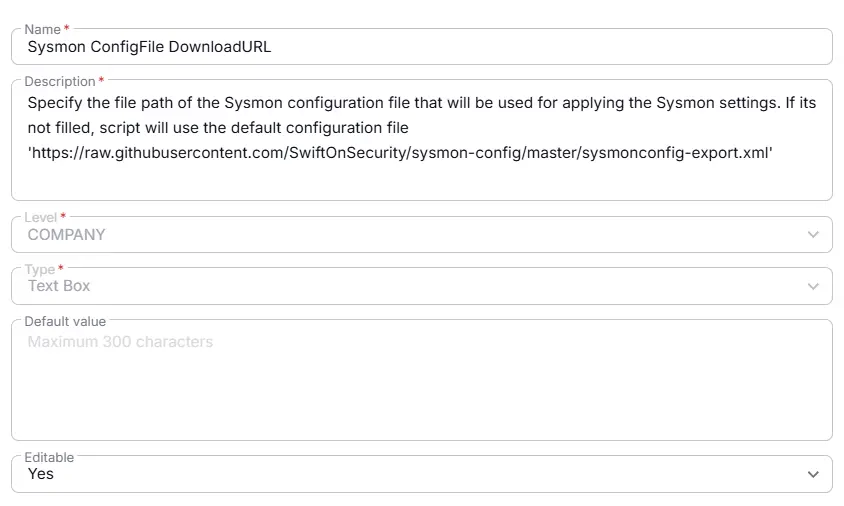
| Name | Level | Type | Default | Editable | Description |
|---|---|---|---|---|---|
| Sysmon ConfigFile DownloadURL | Company | Text Box | Yes | Specify the file path of the Sysmon configuration file that will be used for applying the Sysmon settings. If its not filled, script will use the default configuration file 'https://raw.githubusercontent.com/SwiftOnSecurity/sysmon-config/master/sysmonconfig-export.xml' |
Creation Process
Step 1
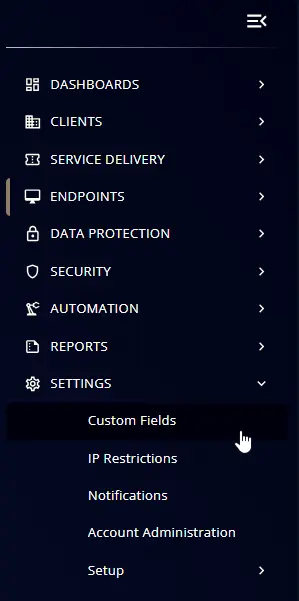
Navigate to Settings ➞ Custom Fields
Step 2
Locate the Add Field button on the right-hand side of the screen and click on it.

Step 3
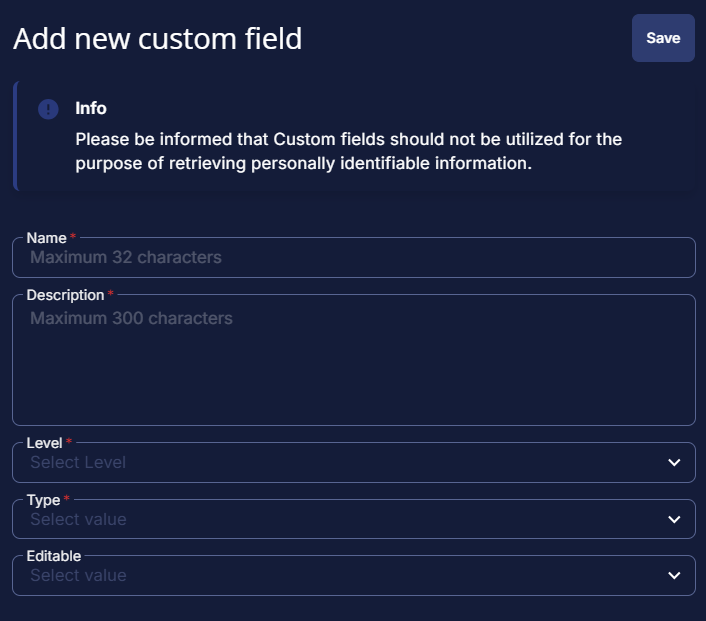
The Add new custom field dialog box will occur
Completed Custom Field
Changelog
2026-03-26
- Initial version of the document